DataForge Cloud 11.0 Version Features Blog
DataForge Cloud 11.0 is here! This release brings Key History, Track Deletes, and data edits to Key Refresh sources, along with incremental cloning and Databricks Runtime 18.
Action Required Before Upgrading
11.0 is a major release with breaking changes. Databricks deployments must set databricks-warehouse-id to an accessible serverless SQL warehouse, and every legacy Hive source (including inactive sources) must be converted to Unity or deleted before the upgrade can run. Projects now export in format 2.2, which 10.x environments cannot import. Review DataForge 11.0 Breaking Changes and Upgrade Preparation for the complete checklist before you schedule the upgrade.
Table of Contents
- Key History
- Track Deletes for Key Refresh Sources
- Data Edits for Key Refresh Sources
- Talos and MCP Updates
- Incremental Cloning
- Project and Git Improvements
- Data View on Your SQL Warehouse
- Databricks Runtime 18
- Custom Notebook and SDK Updates
- User Experience Improvements
- Performance Improvements
- Delta Table Layout Migration
- Outcrop for Debian Linux
- Metastore Upgrade to PostgreSQL 18
- Databricks Cost Attribution Tags
- Full Changelog
Key History
Key Refresh sources keep only the current version of each record, so there is no record of how a key changed over time. In 11.0 you can keep every retained version of each key in a linked history source, without building a separate pipeline.
Turn on Enable History in the Capture Data Changes settings of a Key Refresh source. DataForge creates a linked source named <source name> - History and backfills it from the data the parent already retains. Each source links to the other from its settings.
The history source contains the parent's raw attributes plus s_parent_key, s_hash, s_record_status_code, and s_start_timestamp. The start timestamp comes from the parent's CDC timestamp, falling back to the input's extract datetime when the source has no date column. Unchanged (U) rows are skipped, so every history row is a new (N), changed (C), or, with Track Deletes, deleted (D) version.
DataForge also generates two editable objects on the history source. An M:1 relation named parent joins back to the parent on [This].s_parent_key = [Related].s_key. A Keep Current rule named s_end_timestamp closes each version when the next one starts:
COALESCE(
  LEAD([This].s_start_timestamp) OVER (
    PARTITION BY [This].s_parent_key
    ORDER BY [This].s_input_id
  ),
  CAST('9999-12-31 23:59:59.999999' AS TIMESTAMP)
)
After each successful CDC on the parent, a History Replication process adds a matching history input. Running Reset All CDC on the parent rebuilds the full history without duplicates.

Point-in-time lookups into a history source are inferred as M:1, so you can use them without extra aggregation. The relation must match the key and bound a timestamp between s_start_timestamp (inclusive) and s_end_timestamp (exclusive):
[This].key = [Related].s_parent_key
AND [This].x_datetime >= [Related].s_start_timestamp
AND [This].x_datetime < [Related].s_end_timestamp
Key History is supported on Databricks and Snowflake.
For more information, visit the Source Settings documentation.
Track Deletes for Key Refresh Sources
Rows deleted from a Key Refresh source table were never captured. The key stayed active in the hub table and in your outputs. The new Track Deletes option (track_deletes) in Capture Data Changes finds removed keys, records them as deletes in CDC, and removes them from your direct outputs.
DataForge needs the complete set of current keys on every ingestion to know what disappeared:
- Full snapshots. When the source query has no top-level
WHEREclause, or the source is a file, API, or loopback source, the main input already contains every key. - Incremental table queries. When the source query has a top-level
WHEREclause, DataForge reads the complete key set with the All Keys Query (all_keys_query). It is generated for simple single-table queries. Complex queries need it written by hand, and DataForge prompts you to review it when the source query or key columns change. - Custom ingestion. Pass the complete key set with
all_keys_dfin the Python SDK orallKeysDataFramein the Scala SDK.
Any active key missing from the complete key set produces a CDC record with status D and is removed from the active hub table. Deletes are stored per input in ore._{source_id}_deletes, so retries and Reset All CDC reproduce the same result. A key that reappears later comes back as a new (N) record.
Deletes propagate to output channels sourced directly from the Key Refresh source. JDBC outputs delete the missing keys, and Databricks outputs apply them in the output MERGE. Deletes do not propagate through related or joined channels.
If the separately retrieved key set fails, is empty, contains null keys, or has the wrong columns, ingestion fails and no existing data is deleted. Complete key files are kept for 90 days by default before Cleanup removes them.
For more information, visit the Source Settings documentation.
Data Edits for Key Refresh Sources
Sometimes data in a source is simply wrong, or a row needs approval before it moves downstream. 11.0 lets Admin users correct values, add rows, and remove rows directly from Data View, with full audit history and without touching the source system.
Turn on Allow Data Edits in Capture Data Changes on a batch Key Refresh source with key columns configured. Only Admin users can change this setting or make edits, and enabling it does not require a CDC reset.
Edits target a new rule type, Override (type O). An Override rule calculates a value like any other rule, and an Admin can override that value for individual keys. Keys, raw attributes, and other rule types stay read-only. DataForge adds two reserved Override rules:
| Rule | Editable | Purpose |
|---|---|---|
s_approved_flag |
Yes | Defaults to true. Set it to false to hold a row back. |
s_override_delete_flag |
No | Shows whether the row was deleted through data edits. Displayed as a grey system column. |
Rows that are unapproved or deleted through data edits get validation status Fail. Standard Pass and Warn outputs exclude them, and lookups and output relations that join to the source only include approved, undeleted rows.
Data View stays read-only until you turn on Edit Data. You can then set a value, set an explicit NULL, clear an override, add, delete, or restore a row, and view a row's history. Edited cells are highlighted in yellow, and Deleted Rows Only filters to rows removed through data edits.
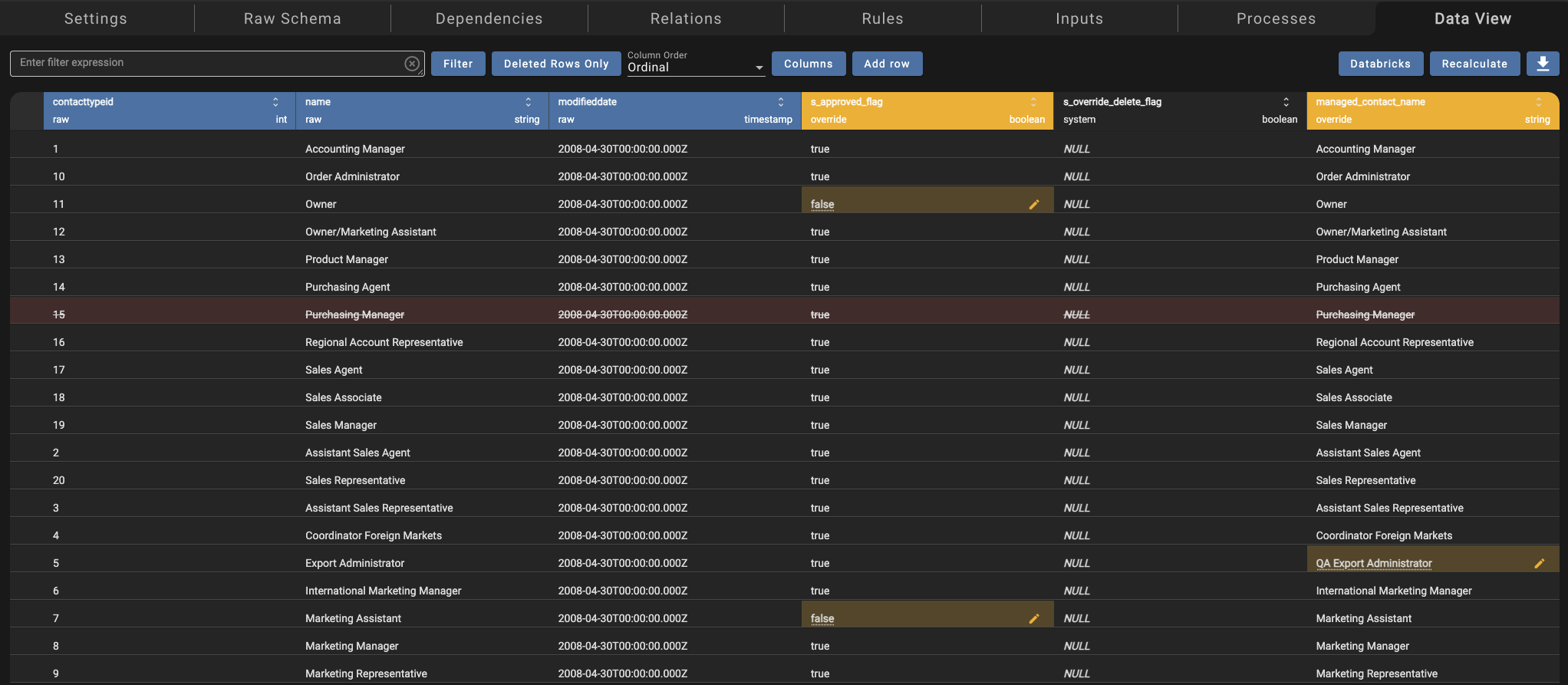
Edits are applied on recalculation, so make a batch of changes and then click Recalculate once. Overrides and added rows are reapplied on every refresh before dependent rules run, so your edits survive new ingestions.
Every edit is stored as an immutable event in the MDM schema of your warehouse, including who made the change and when. Stale edits are rejected if the value changed since you loaded it. Turning Allow Data Edits off erases the edit history and converts Override rules to regular enrichment rules, after a confirmation warning.
Talos can query and apply edits with the query_managed_data_rows and apply_managed_data_changes tools. Data edits are supported on Databricks and Snowflake and are not available for streaming sources.
Talos and MCP Updates
- Locked projects are protected. Talos and the MCP server can still diagnose issues, start, reset, and fail processes, and toggle Disable Initiation in a locked project. They can no longer add or change sources, outputs, rules, relations, dependencies, or settings there.
- Simpler table discovery.
find_connection_tablesnow takes an exactconnection_idwith typed regex filters (schema_name_regex,table_name_regex,column_name_regex), andinspect_connection_tableshas been removed. Standard MCP clients pick this up automatically. Custom scripts that hard-code the old parameters need updating. - Input deletion. The MCP server can delete individual source inputs.
- Safer configuration changes. Output mappings must reference rules rather than inline expressions, and rule tools no longer edit or silently unlink template-linked rules. Connection sub-types and file source parameters are discoverable, and invalid values are rejected.
For more information, visit the Setting Up the DataForge MCP Server documentation.
Incremental Cloning
Cloning a group is a one-time operation. Once groups were in production, new sources, rules, and outputs added to one group had to be rebuilt by hand in every other group. Incremental cloning copies only what is missing into groups that already exist.
Open the source group's Settings, click Incremental clone, and select one or more target groups. DataForge runs one independent clone per target group and works in dependency order:
- Resolves or creates templated sources, outputs, output channels, and relations.
- Adds missing raw attributes, matched by column alias and datatype.
- Applies missing rule templates, so later templates can use attributes created by earlier ones.
- Adds output mappings when the target channel, column, and every referenced attribute exist.
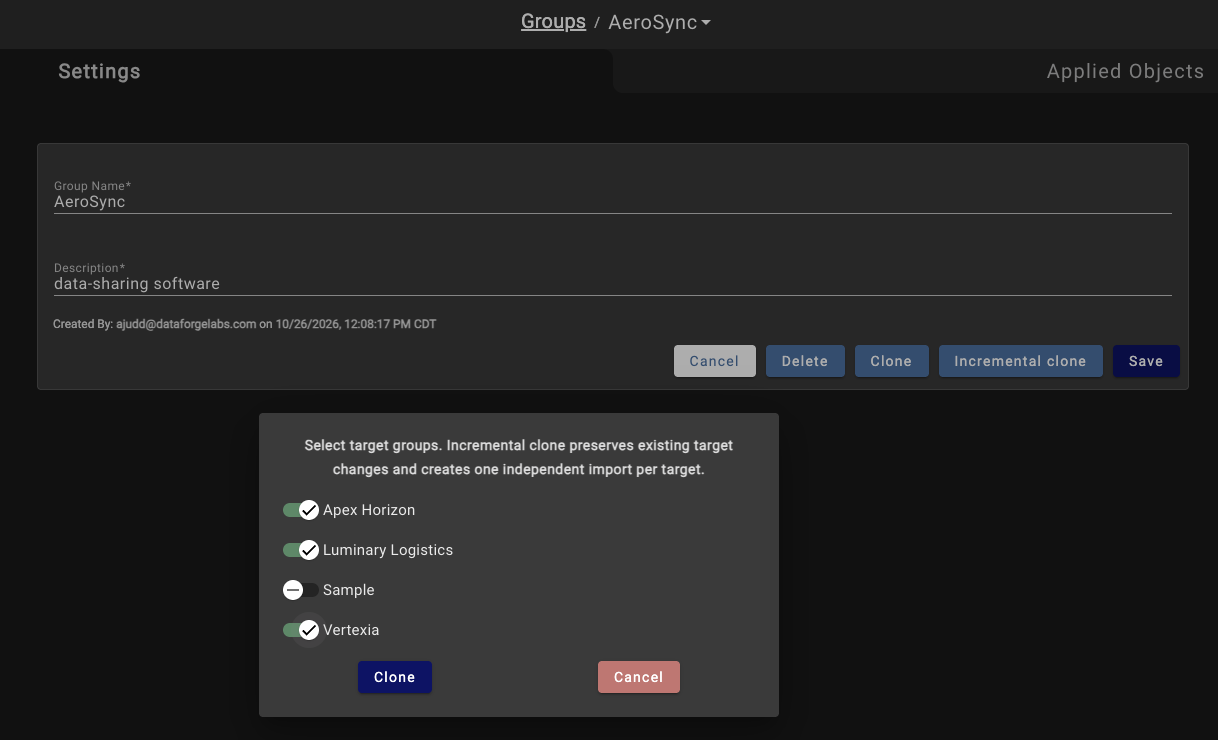
Objects are matched by source, relation, and rule template, and existing objects are reused rather than duplicated. Changes are additive only. Each object is reported as Create, Skip (an equivalent already exists), Conflict (a different object exists and is left alone), or Blocked (a required dependency is missing). Results appear in the Imports tab for each target group. Non-templated rules and relations are not cloned, since a target group may need different logic.
For more information, visit the Cloning Overview documentation.
Project and Git Improvements
Roll back a Git Pull
A Git Pull can overwrite changes made in DataForge that were never pushed. The Imports tab now offers Rollback for a successful Git Pull whenever a pre-import backup exists. The confirmation warns that later project changes may be replaced and that the Git sync commit is not reset.
Ignore source dependencies in a project
Pulling one source into a development project can drag in its entire chain of dependencies, sometimes hundreds of tables. Turn on Ignore Source Dependencies in Project Settings to stop time-based source dependencies from blocking processing in that project. Existing dependencies are kept, and the setting is not changed by imports or Git pulls.
Hub view catalog override
Qualified hub view names (schema.view or catalog.schema.view) could collide across projects that share a warehouse. A new reserved project variable, view_catalog_name, sets the catalog (the database on Snowflake) for qualified hub views in each project. DataForge now rejects conflicting view destinations across projects at save and import time. If an import contains qualified hub view names and the variable is missing, the import creates it blank and stops so you can populate it and retry.
Other project changes
- Projects now import and export in format 2.2. 11.0 rejects 2.1 imports, and 10.x cannot import 2.2.
- Exports no longer wrap long YAML lines and use a stable order for output mappings and defaults, so pushing unchanged content no longer produces a diff. Your first export after upgrading may show a one-time formatting change.
- Project variables are reapplied on Git Pull even when no files changed.
- Leftover temporary branches from a failed Git operation are cleaned up on the next run.
- An Empty Project action in project settings deletes every object in a project while keeping its variables and Git connection. You must type the project name to confirm.
For more information, visit the Projects Overview documentation.
Data View on Your SQL Warehouse
Source Data View queries now run directly through the DataForge API, using your configured Databricks serverless SQL warehouse or your Snowflake JDBC connection. The dedicated Data Viewer cluster and the Sparky data query queue have been removed. Data View no longer waits on a cluster to start, and errors are shown in the page.
On Databricks, set databricks-warehouse-id in Global System Configurations to an accessible serverless SQL warehouse. The same warehouse is used for expression validation, Data View, Talos data queries, and data edits. DataForge does not fall back to another warehouse. If the setting is missing or invalid, each affected workflow shows a configuration error. For most environments, a 2X-Small serverless warehouse with scaling set to Min 1 and Max 1 is enough. Snowflake deployments need no new setting.
The use-default-cluster-as-data-viewer, databricks-data-viewer-id, and databricks-jdbc-uri settings have been removed.
For more information, visit the Global System Configurations documentation.
Databricks Runtime 18
DataForge processing on Databricks now runs on Databricks Runtime 18 with Spark 4.1, Scala 2.13, and Java 21. Existing Sparky and custom notebook jobs are upgraded during deployment, and the Python SDK now requires Python 3.12 or later.
Spark 4 turns on ANSI SQL mode by default, so rules and notebooks that relied on invalid casts quietly returning NULL may now fail. Use try_cast where a NULL result is intended, or set spark.sql.ansi.enabled to false on the affected cluster. Customer Scala libraries compiled for Scala 2.12 need to be rebuilt.
The legacy Hive processing path and the Convert to Unity workflow have been removed. You can still read from and write to hive_metastore by setting catalog = hive_metastore on a Unity connection or Delta output. The Scala SDK is now packaged inside the Sparky JAR, which shortens cluster startup for every job.
For more information, visit the DataForge 11.0 Breaking Changes and Upgrade Preparation documentation.
Custom Notebook and SDK Updates
Custom notebooks run through Sparky
Custom ingestion, parse, and post-output notebooks no longer launch their own single-use Databricks jobs. They run through Sparky on your configured processing compute, with status, timeouts, and errors reported on the DataForge process. The upgrade migrates existing notebook paths, parameters, and custom notebook clusters. Review the migrated settings after upgrading.
Repository Path for per-project notebooks
The Notebook setting is split into an optional Repository Path and a required Notebook Path. A new Repository Path project variable type replaces the repository path on import, so each project can run the same source against its own copy of a notebook. For example, a Default project can use /Workspace/datalake/dataforge-sdk/Loopback while a developer's project uses the same notebook in their own Git folder.
Queue ingestion from post-output
PostOutputSession.enqueue_ingestion(source_name) is available in both the Python and Scala SDKs. Call it from a post-output notebook to queue a custom ingestion source in the same project. The ingestion runs as its own process instead of being nested inside the post-output session, and it respects Disable Initiation settings. Finish writing any data the ingestion needs before you call it.
More SDK changes
IngestionSession(source_name, project_name)now creates a separate process and input for the named source when it differs from the notebook's own source.- Custom connections can now have Direction set to Output. Post-output notebooks read their parameters by name with
session.connection_parameters(name)in Python orsession.connectionParameters(name)in Scala.
For more information, visit the DataForge SDK for Custom Processing documentation.
User Experience Improvements
Saved views on the Sources page
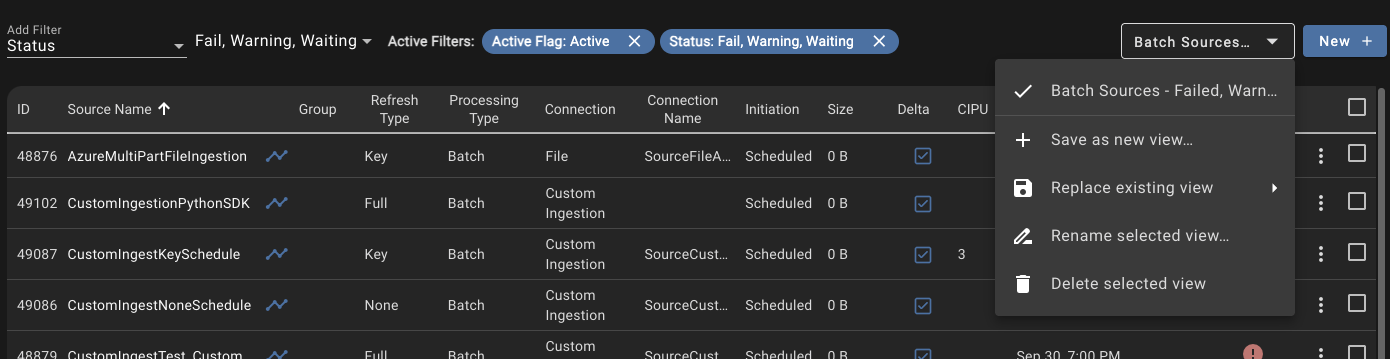
Save a set of filter selections on the Sources page as a named view, then switch between views from the views menu above the source list. The same menu lets you replace, rename, or delete a view. Filters also accept multiple values, so you can show every source with a status of Fail, Warning, or Waiting at once.
Bulk delete with typed confirmation
Bulk Update on the Sources page now includes Delete Source and Delete Source Data. Both require you to type delete before the action runs.
Lineage group filter without ungrouped objects
Ungrouped in the lineage Filter by group dropdown can now be cleared, so the graph shows grouped objects only. It stays selected by default, and the choice is saved in the page URL.
Grouped system settings and history retention
Global System Configurations are now organized into groups such as Cleanup, Processing, Services, and Talos, with a group filter. Three new settings control how long history is kept: profile-history-retention-interval (90 days), configuration-history-retention-interval (6 months), and agent-metrics-retention-interval (30 days).
Smaller improvements
- The Applied Objects tab for connections, schedules, compute configurations, and process configurations shows a Project column, and every column is sortable.
- The source list shows hub table size for stream sources.
- Source and process pages pause automatic refresh while the browser tab is hidden.
Performance Improvements
- SQL Server stream initial loads and full reloads transfer data as compressed Avro instead of inline SQL statements.
- Project import is faster and stores less duplicate data.
- High-load metastore functions, linked rule template propagation, and ingestion queue polling have been optimized.
- Concurrent Sparky processes contend less for output schema locks.
- Compatible database function changes deploy without stopping running services.
- Outcrop batches its log messages, caches validated tokens, and reloads a stream early when catching up would be slower than a full load.
Delta Table Layout Migration
Full refresh sources usually keep only their last few inputs, yet cleanup spent significant time deleting old inputs from liquid-clustered tables. 11.0 changes how new Databricks lake tables are created and adds a Migrate Delta Tables action for existing tables.
- Full refresh ORE, MINERAL, and ALLOY tables are partitioned by
s_input_id, so deleting an old input drops a partition instead of rewriting data. - Other refresh types no longer use
CLUSTER BY AUTOon ORE, MINERAL, and ALLOY. Tables use their selected keys as fixed clustering keys, or no clustering when no keys are selected. - INGOT tables use automatic clustering only when you turn on Enable Cluster By Auto in the source's Performance & Cost settings. Turn on Databricks Predictive Optimization before enabling it.
Run Migrate Delta Tables from a source's Inputs tab or from Bulk Update on the Sources page, and filter the source list by Delta Migration status to find sources that need it. Migration pauses the source, converts and verifies the tables, then restores the source's original initiation setting. If migration fails, the source stays paused so you can investigate.
For more information, visit the DataForge 11.0 Breaking Changes and Upgrade Preparation documentation.
Outcrop for Debian Linux
Outcrop, the DataForge agent, can now be installed on Debian family Linux hosts as well as Windows. The Agents page has Install on Windows and Install on Debian actions, each of which copies a ready-to-run install command with a signed installer URL that expires after 15 minutes.
The Debian package runs Outcrop as a systemd service under a dedicated dataforge-agent user and requires an amd64 host, Java 21, and at least 2 GB of memory. The dataforge-agent-machine-id command produces the value for the Machine GUID field, and automatic updates work the same way as on Windows.
Outcrop authentication is also more secure. Protocol 2.0 agents exchange their agent password once for a 12-hour token instead of sending the password with every request. Customer-installed agents need auto-update enabled to move to 11.0 automatically.
For more information, visit the Installing Outcrop documentation.
Metastore Upgrade to PostgreSQL 18
The DataForge metastore moves from PostgreSQL 16 to PostgreSQL 18, and database authentication moves from MD5 to SCRAM-SHA-256. DataForge SaaS also rotates selected metastore credentials with each platform version, and private deployments can opt in to the same behavior.
DataForge-managed components are updated as part of the upgrade. If you connect to the metastore with your own clients, such as monitoring or backup tools, verify that they support SCRAM-SHA-256 and update any saved credentials.
For more information, visit the DataForge 11.0 Breaking Changes and Upgrade Preparation documentation.
Databricks Cost Attribution Tags
DataForge now tags the Databricks compute it manages, so you can report on DataForge spend from Databricks billing data. Every DataForge job cluster gets a dataforge_cluster_id custom tag set to its Compute Configuration ID. Existing custom tags are preserved. Dedicated SQL warehouses for SQL Server streaming should be created with dataforge_cluster_id=streaming.
SELECT custom_tags['dataforge_cluster_id'] AS dataforge_cluster_id,
       SUM(usage_quantity) AS dbus
FROM system.billing.usage
WHERE NULLIF(custom_tags['dataforge_cluster_id'], '') IS NOT NULL
GROUP BY 1
ORDER BY dbus DESC
For more information, visit the DataForge Cost Dashboard documentation.
Full Changelog
- Added Key History for Key Refresh sources, with a linked history source, a generated
s_end_timestamprule, and M:1 inference for bounded history lookups. - Added Track Deletes for Key Refresh sources, with delete capture in CDC and physical deletion from direct output channels.
- Added data edits for batch Key Refresh sources through Data View, the Override rule type, and the
s_approved_flagands_override_delete_flagreserved rules. - Added incremental cloning of templated sources, relations, rules, and output mappings into existing groups.
- Added the Migrate Delta Tables action and Delta Migration status, partitioned new full refresh lake tables by
s_input_id, and removed default automatic clustering. - Added the Enable Cluster By Auto source setting for INGOT tables.
- Added Outcrop installation on Debian Linux.
- Added the
dataforge_cluster_idcustom tag to DataForge-managed Databricks job compute. - Added
PostOutputSession.enqueue_ingestion(source_name)to the Python and Scala SDKs. - Added Output direction to Custom connections and named connection parameter access in post-output notebooks.
- Added Repository Path and Notebook Path source parameters and the Repository Path project variable type.
- Added the
view_catalog_nameproject variable and cross-project hub view destination checks. - Added the Ignore Source Dependencies project setting.
- Added Rollback for Git Pull imports in the Imports tab.
- Added the Empty Project action to project settings.
- Added saved views and multi-value filters to the Sources page.
- Added Delete Source and Delete Source Data to Bulk Update.
- Added the option to exclude ungrouped objects from the lineage group filter.
- Added a Project column and column sorting to the Applied Objects tab.
- Added hub table size for stream sources to the source list.
- Added grouping to Global System Configurations and new profile, configuration, and agent metrics retention settings.
- Added MCP support for deleting individual source inputs.
- Changed Data View to run queries through the API on the configured SQL warehouse or Snowflake JDBC connection, and removed the dedicated Data Viewer cluster.
- Changed Databricks processing to DBR 18 with Spark 4.1, Scala 2.13, and Java 21. The Python SDK now requires Python 3.12.
- Changed custom notebooks to run through Sparky on configured processing compute instead of single-use jobs.
- Changed the Scala SDK to be embedded in Sparky to reduce cluster startup time.
- Changed project import and export to format 2.2.
- Changed Outcrop protocol 2.0 authentication to API-issued, 12-hour bearer tokens.
- Changed the metastore to PostgreSQL 18 with SCRAM-SHA-256 authentication and version-based credential rotation.
- Changed human usernames to be case-insensitive, merging users whose email addresses differed only by case.
- Changed MCP table discovery to
find_connection_tableswith an exactconnection_idand typed regex filters, and removedinspect_connection_tables. - Changed Talos dependency recommendations to only suggest dependencies between sources on the same schedule, and to recommend removing existing dependencies between sources on different schedules.
- Changed project exports to reduce Git diff noise.
- Removed legacy Hive processing, the Convert to Unity workflow, and the
databricks-db-name,use-default-cluster-as-data-viewer,databricks-data-viewer-id, anddatabricks-jdbc-urisettings. - Removed Talos and MCP permission to change configuration in locked projects.
- Upgraded the UI to the latest Angular and Auth0 library versions.
- Improved recovery of Databricks Sparky runs after spot instance termination.
- Improved Outcrop streaming with JDBC timeouts and diagnostics that prevent silent stalls.
- Improved logging of PostgreSQL lock waits and Sparky scheduler wait transitions.
- Improved error handling for Azure private deployment upgrades.
- Fixed Cleanup failing on DBR 18 for environments that store DataForge files at the root of a storage bucket not covered by a Unity Catalog external location.
- Fixed renaming a rule or column used in an output channel filter breaking the output channel.
- Fixed key refresh CDC rewriting unchanged records when no timestamp rules exist.
- Fixed CDC reset not fully replaying an incremental source after its query configuration was restored.
- Fixed templating a rule ignoring the relation path already saved on the rule.
- Fixed the Validate and Apply buttons staying disabled in the template apply to sources dialog.
- Fixed the Remove Linked Sources button being clipped on the Rule Template Linked Sources page.
- Fixed transient Git authentication failures during remote Git operations by retrying them.
- Fixed importing stream sources starting an unnecessary CDC reset.
- Fixed Change Tracking validation blocking the initial batch query when saving a stream watermark.
- Fixed Git Pull deleting raw attributes from existing streaming sources.
- Fixed import failing or recreating existing channels when default channel names were omitted.
- Fixed null output mapping datatypes, which are now repaired during deployment.
- Fixed source status refresh losing a success or failure when processes completed at the same time.
- Fixed a custom post-output pass hiding a failed output source status.
- Fixed unmanaged refresh creating unnecessary managed Delta tables and failing ingestion on storage access.
- Fixed a failed agent stream input being deleted and leaving the source with zero record counts.
- Fixed stale input waiting status remaining after a reset removed queued work.
- Fixed recalculation failing on array columns after Override edits.
- Fixed Python SDK Databricks Postgres helper imports and initialization.
- Fixed custom JVM options being dropped from Azure Databricks job configuration.
- Fixed AWS deployments resetting ECS service desired counts to one.
- Fixed the post-authentication callback restoring a page the user was not authorized to view.
- Fixed the Inputs popup duplicate key and Same counts.
- Fixed the Inputs page staying filtered after moving to the Process tab and back.
- Fixed layout issues on the lineage toolbar, Output Mapping page, Git Pull confirmation dialog, Sources dropdown, and Data View error display.
- Fixed the MCP
wait_for_processingtool reporting success while output channels had failed. - Fixed the MCP
update_output_mappingtool clearing a column's datatype when the field was omitted. - Fixed the MCP
create_table_sourcetool writing an internal ID into the source description.