Data Storage
Alloy enforces a single, explicit storage model for every batch DataForge pipeline. Data moves through the same named layers for each batch source, so teams can understand where data is, what has happened to it, and which process owns the next transition. Every batch pipeline follows these layers -- there are no hidden storage stages or pipeline-specific shortcuts outside the enforced architecture.
- ORE: source data captured in its original form
- MINERAL: detected changes isolated for incremental processing
- ALLOY: incrementally enriched data shaped by configured logic
- INGOT: refined, durable representations for reuse and exploration
- PRODUCT: final outputs optimized for analytics, applications, and downstream systems
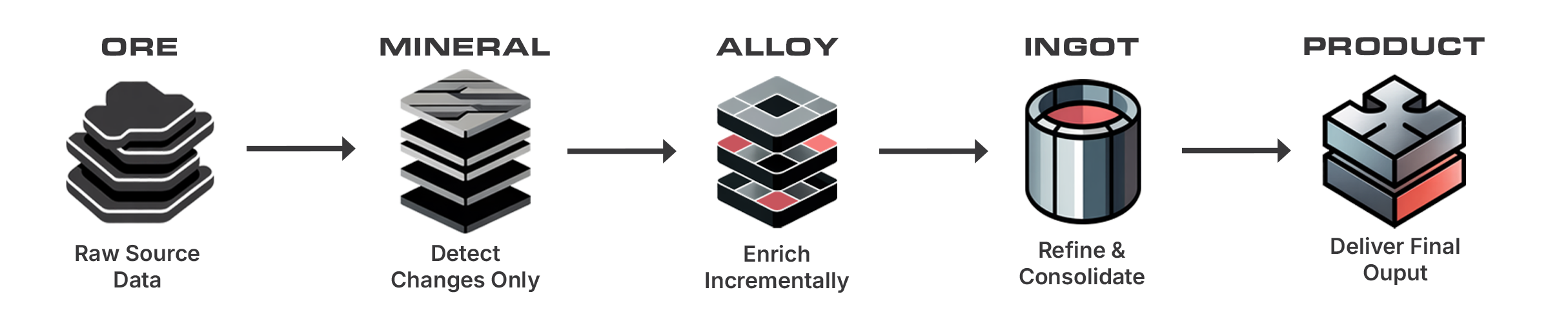
Stream sources take a shorter path. They write directly to the INGOT hub table and do not use ORE, MINERAL, or ALLOY. See Stream Sources below.
ORE
ORE is the platform's consistent starting point. During ingestion, source data is copied into its ORE table in its original form. No business transformation occurs in ORE -- the purpose of this layer is to make raw source data observable, durable, and available to downstream Alloy execution steps.
MINERAL
MINERAL isolates source changes so incremental processing is the default path. Parsing and change detection standardize the incoming data and identify the rows that need to move forward. This layer gives the rest of the pipeline a predictable input set -- downstream steps do not need to rediscover file formats, source-specific ingestion details, or change boundaries.
ALLOY
ALLOY is the structured transformation layer. Data is enriched incrementally using the rules, relations, validations, and other configured logic that describe how the data should be shaped and interpreted. Declarative logic is preferred; custom processing is introduced only through defined extension points.
INGOT
INGOT contains refined and consolidated data representations that are durable and reusable. For source-oriented processing, this includes the maintained source hub tables that DataForge generates and refreshes. Hub tables can be queried directly in Databricks or Snowflake and serve as an exposure point for data exploration -- for use cases that only require exploration or data sharing, INGOT may be the final layer used. INGOT tables are exposed to users through views created in the project schema; the view name is configured in the source settings in the DataForge UI.
PRODUCT
PRODUCT is the output layer for curated data intended for analytics, applications, and downstream systems. Output mappings control how data from INGOT maps into destination schemas and storage technologies, such as SQL Server, Delta Lake, Snowflake, or another configured destination. The Outputs Mapping tab in the UI dictates how refined data maps to the final PRODUCT location.
Stream Sources
Stream sources do not move through the layer progression described above. Every streaming path writes directly to the INGOT hub table for the source. No ORE, MINERAL, or ALLOY table is created or maintained for a stream source.
The supported streaming paths differ in where processing runs and what configured logic can be applied:
- Event - Kafka and Table - Delta streams run on the platform's Spark streaming cluster. Configured enrichment logic is applied in flight as each micro-batch is processed, and the enriched result is written to the hub table. The logic that would run in ALLOY still runs -- it is simply never materialized as an ALLOY table.
- Table - SQL Server streams run through Outcrop, the DataForge agent that runs inside your network. Outcrop performs the initial full load and applies ongoing row-level changes directly against the hub table over a Databricks Serverless SQL Warehouse. No enrichment is applied on this path.
Rules and relations on stream sources
Rules and relations can be configured on Kafka and Delta stream sources, subject to the limitations listed in Source Settings.
Rules and relations cannot be applied to SQL Server stream sources. The hub table for a SQL Server stream holds the replicated source data as it arrives from CDC or Change Tracking. To apply DataForge rules, relations, or validations to that data, add a virtual output to the streamed source and create a second source that reads it through a Loopback connection. The loopback source is a batch source, so it follows the full ORE -> MINERAL -> ALLOY -> INGOT progression.
Physical Storage
The logical layers map to physical database objects using a predictable naming pattern.
| Logical layer | Database | Schema | Table |
|---|---|---|---|
| ORE | DataForge database | ORE |
_<source_id> |
| MINERAL | DataForge database | MINERAL |
_<source_id> |
| ALLOY | DataForge database | ALLOY |
_<source_id> |
| INGOT | DataForge database | INGOT |
_<source_id> |
| PRODUCT | Defined in output settings | Defined in output settings | Defined in output settings |
For ORE, MINERAL, ALLOY, and INGOT, DataForge owns the physical storage location. Each batch source has a table in the schema that matches the logical layer name, with the table name using the source ID prefixed with an underscore. Stream sources have an INGOT table only.
PRODUCT storage is controlled by the configured output. The destination database, schema, and table are all defined in the output settings.
Source ID Naming
The table name in the Physical Storage section -- _<source_id> -- deserves explanation. Every source in DataForge is assigned a unique system ID at creation. That ID, not the source's display name, is used as the physical table name in ORE, MINERAL, ALLOY, and INGOT. Developers never define or manage these names; the platform handles them entirely.
This matters because DataForge is designed to support multiple logical environments (dev, test, prod) as Projects within a single physical workspace. A display-name-based approach would require fully separate databases per environment to avoid table name collisions. System-managed IDs make coexistence possible without coordination overhead. The benefits extend throughout the platform lifecycle:
-
Virtual environment support
- Multiple Projects run within a single physical workspace, sharing connections, schedules, and compute configurations
- New environments can be provisioned or destroyed instantly without infrastructure changes
- See Projects Overview for details on the Project model
-
Source rename support
- Renaming a source in the UI does not rebuild managed tables or break existing queries
- The storage layer is unaffected because the display name is not load-bearing
- Only the user-facing INGOT view name changes
-
Zero naming overhead
- Developers never define, maintain, or coordinate table names
- No naming conventions to enforce, no reserved words to avoid, no case sensitivity to manage
- The system generates valid, unique names for every managed object regardless of how many Projects share the workspace
-
Decoupled storage identity from presentation
- Storage objects carry a system-generated identity; human-readable labels are applied only at the INGOT view layer
- Labels can change freely without touching storage
- Systems that conflate the two force physical infrastructure changes whenever business language changes
-
Lineage and process history
- Logs, run history, and troubleshooting references stay tied to the same physical table for the life of the source
- Renames and configuration changes do not affect process history
The Hub View Schema configured per Project is the user-facing naming layer -- each Project exposes views named after the source display name in a project-owned schema. The underlying managed tables use system-assigned IDs. This is the boundary between user-readable names and platform-managed storage.