Output Settings
The Output Settings screen contains tabs for Settings, Mappings, and Output History. Only the Settings tab is visible when initially creating an output.
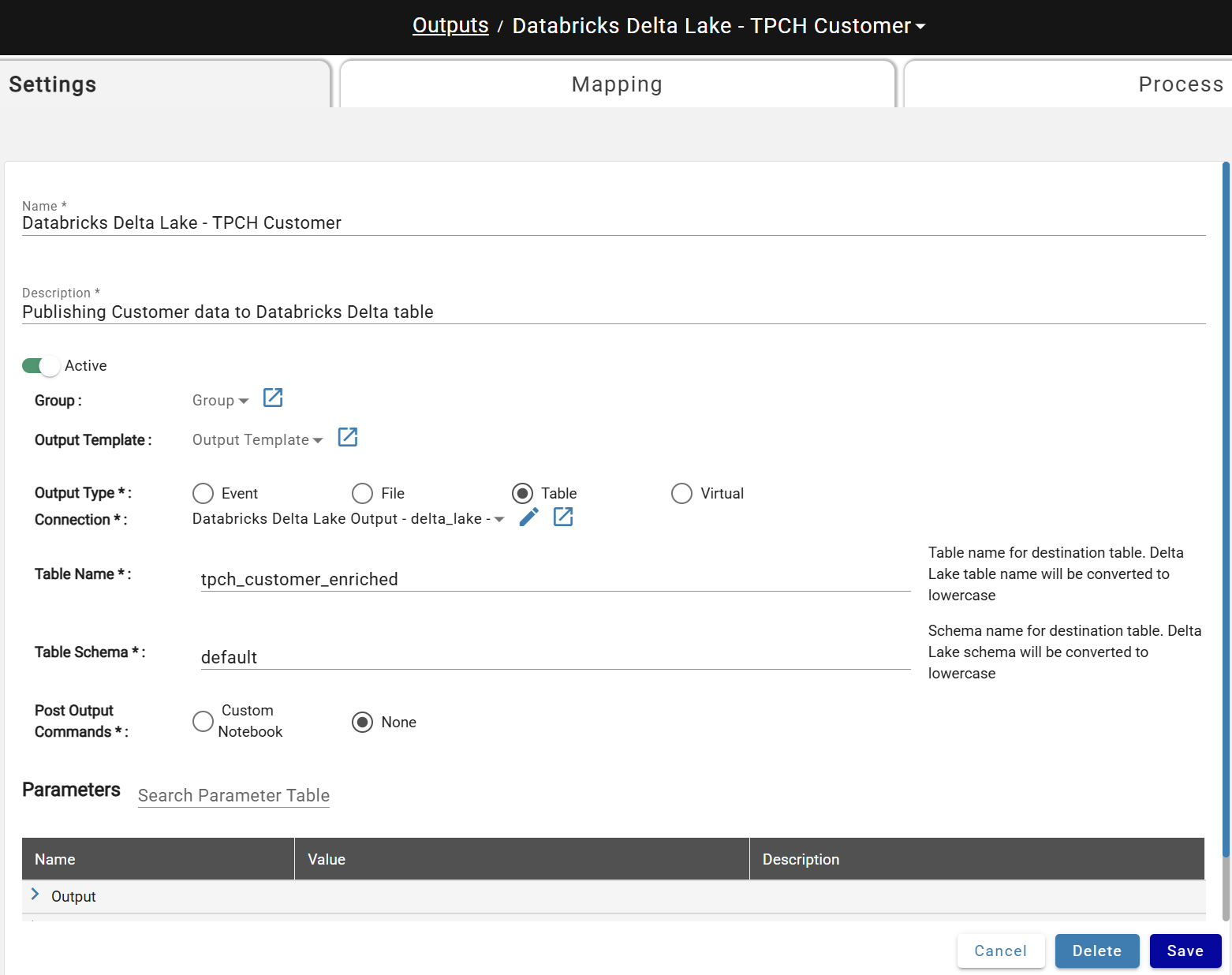
Initial Parameters
- Name: Unique name for the output.
- Description: Description of the output.
- Active: If Active, the output is immediately available and channels connected to it will automatically run at the end of all processes.
Output Type
Parameters change dynamically based on the selected type. Stream sources support Event, Delta Table, and Virtual output types; batch sources support all types.
- Event: Publish data to an event topic. See Kafka Events Connections.
- File: Write a file using a File Connection. File types: Avro, CSV, JSON, Parquet, or Text.
- Table: Write and refresh data to a database table using a Table Connection. Driver on the connection determines the table format.
- Virtual: Create a database view over hub tables in the connected data platform, without pushing data to an external system.
Output Parameters
Asterisks (*) in the Parameter Name column indicate mandatory parameters
Output
| Appears Under | Parameter Name | Default Value | Description |
|---|---|---|---|
| Table, File | Connection* | Name of the DataForge connection used to write the output to the desired destination | |
| Table | Table Name* | Name of output table to be written in the target DB | |
| Table | Table Schema* | Name of the schema the output table will be written to in the target DB. | |
| Table | Output Source Id Partition | TRUE | Designates whether output_source_id will be top level partition and only applies to Delta Lake outputs. |
| Table | Manage Table | TRUE | Decides if you want table to be altered if there are missing columns, or automatically updated if new columns are added |
| Table | Reset Channels On Delta Overwrite | TRUE | Reset all other output channels when Delta Lake table is overwritten due to schema changes. Only applies to Delta Lake output. |
| Table | Delete Orphan Data | TRUE | Delete data from output table that was created by a channel that no longer exists. Does not delete rows where s_output_source_id is null |
| Table | Create Cci On Table | FALSE | Creates clustered columnstore index on destination table. We recommend CCI on SQL server output tables to improve performance and avoid deadlocks. |
| Table (SQL Server) | Batch Size | 5,000 | Helps optimize bulk insert performance. Use higher values for narrower tables and lower values for wider tables. |
| Table (SQL Server) | Table Lock | FALSE | Improves bulk insert performance, but requires an exclusive full table lock. |
| Virtual | View Name* | Name of the Virtual Table/View that will appear in the data platform once the output is processed. | |
| Virtual | View Database | Default | Name of database for virtual view in data platform. |
| File Type: All | File Name* | File name for output file. For all except text, extension will be added automatically. | |
| File Type: Text | File Extension* | Extension that will be appended to the file name when DataForge writes text file outputs | |
| File Type: All | Single File | TRUE (FALSE for Parquet) | Toggle for whether or not the output should be written to multiple files or one single file. Multiple files is more performant |
| File Type: Avro, CSV, JSON, Parquet | Limit By Effective Range | FALSE | Output uses effective range calculations to limit data for Time Series sources |
| Event | Value Schema Type | avro_from_registry | Schema type for selected topic. Used to associate data with schema type during output |
| Event | Key Schema Type | avro_from_registry | Schema type for selected topic. Used to associate data with schema type during output |
| Event | Key Schema | Json (avro) or text (json DDL) specified | |
| Event | Value Schema | Json (avro) or text (json DDL) specified | |
| Event | Key Subject | Schema registry subject for key schema | |
| Event | Value Subject | Schema registry subject for value schema |
Output Retention
| Appears Under | Parameter | Default Value | Description |
|---|---|---|---|
| File Type: CSV, Parquet | Archive Files | 1 year | How long files will remain in archive folder. |
| File Type: CSV, Parquet | Buffer Files | 0 | Interval to retain files in fast output buffer storage |
| File Type: CSV, Parquet | Temporary Files | 14 days | Amount of time temporary files will remain stored |
Output Alerts
| Appears Under | Parameter | Default Value | Description |
|---|---|---|---|
| Table, File, Event | Output Failure Topics | List of AWS Simple Notification Service topic ARNs to be notified upon Output Failure | |
| Table, File, Event | Output Success Topics | List of AWS Simple Notification Service topic ARNs to be notified upon Output Success | |
| Table, File, Event | Output Failure Emails | List of email addresses to be notified upon Output Failure. Requires SMTP setup. | |
| Table, File, Event | Output Success Emails | List of email addresses to be notified upon Output Success. Requires SMTP setup. |
Output Failure Topics and Output Success Topics appear only in DataForge environments hosted in AWS. This depends on where DataForge itself runs, not on the data platform it connects to. See Process Alerts - Configuring Amazon SNS Alerts.

**Post Output Commands ***
When Custom Notebook value is selected, a Custom Compute Configuration for the Post-Output step needs to be selected.
When Custom Notebook value is selected, a Notebook parameter appears. Enter the name of the notebook to run after each output process, including database and schema if the notebook is not in the default DataForge schema. See Setting up DataForge with Snowflake Custom Notebook.