Source Settings
The Settings tab configures key parameters for the Source — where, how, and when to ingest data, how to refresh and track it over time, and infrastructure tuning for performance and cost. When creating a new Source, only the Settings tab is available. After creation, access it via the Settings tab in the upper left.
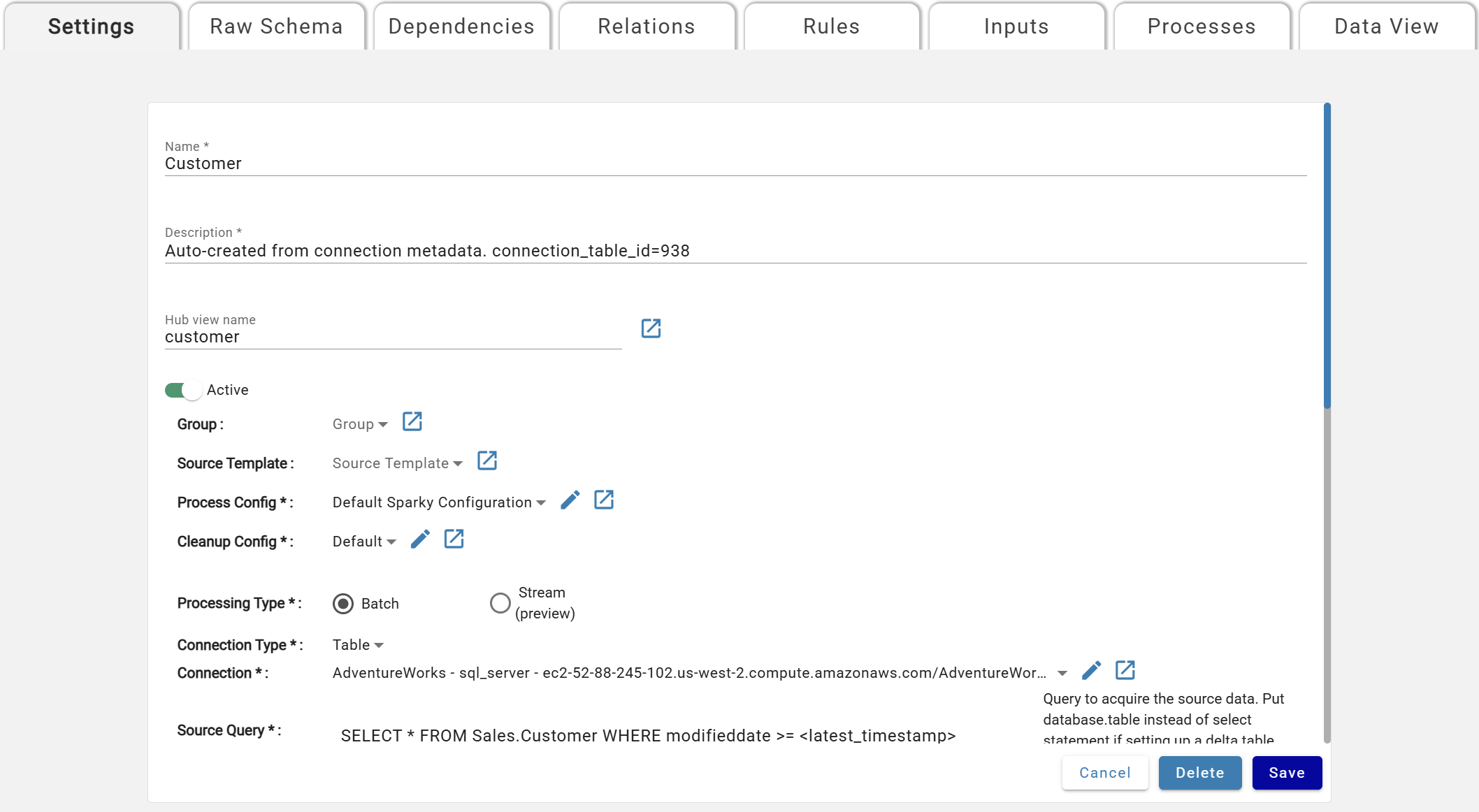
Base Parameters
Asterisks (*) mean the Parameter is mandatory and must be specified by users.
- Name*: Unique source name, displayed on the Sources screen.
- Description*: Description of the Source.
- Hub View Name: View alias for the raw hub table.
- Active*: If set to Active, the Source will run as specified.
- Group: Used as part of Templates and Tokens
- Source Template: Used as part of Templates and Tokens
- Process Config*: The Process Configuration. Selected from a dropdown.
- Cleanup Config*: The Cleanup Configuration. All sources default to Default Cleanup config.
- Processing Type*: Batch or Stream. See Processing Type: Batch vs. Stream below.
- Connection Type*: Selector to help filter the Connection dropdown
- Connection*: The Connection to use for this source
Processing Type: Batch vs. Stream
Sources can either be batch or stream based which is indicated in the source setting processing type. Each processing type has it's own set of parameters that apply.
The following connection types are supported for streaming:
- Event - Kafka
- Table - Delta
- Table - SQL Server — CDC or Change Tracking, ingested through Outcrop
Kafka and Delta stream sources assume a None data refresh type. For more information, view the None refresh type details in the Data Refresh Types section below. SQL Server stream sources are the exception: they use a Key refresh type, and DataForge sets the refresh type and key columns automatically from the source table metadata.
Kafka and Delta stream sources include two additional parameters:
- Trigger Type: For more information, visit the Spark Structured Streaming docs in the "Triggers" section.
- default_micro_batch: Spark decides when to check for new records
- interval_micro_batch: Check for new records every x seconds based on the trigger interval
- available_now_micro_batch: Continues to pull records as long as the stream is sending. Shuts down when stream stops sending records.
- Trigger Interval:
- Time in seconds to wait before pulling another set of records from the stream. If it is not specified, the system will check for availability of new data as soon as the previous processing has been completed. If a trigger time is missed because the previous processing has not been completed, then the system will trigger processing immediately.
SQL Server stream sources do not use trigger parameters. They are configured with a Tracking Method instead — cdc or change_tracking. See SQL Server Streaming for the full setup.
Rules and relations can be used with Kafka and Delta stream sources to enrich and transform data with the following limitations:
- Rules:
- All rules are snapshot recalculation mode
- No window functions or keep-current rules are allowed
- No unique flag is available on rules
- No aggregates are allowed
- No sub-source rules are allowed
- Relations:
- Relations between stream and batch sources need to be of M:1 or 1:1 cardinality with the :1 side of the cardinality being the batch source.
Rules and relations are not available on SQL Server stream sources. Data streamed through CDC or Change Tracking lands in the source's hub table as replicated, without enrichment. To apply rules, relations, or validations to that data, add a virtual output to the stream source and create a second source that reads it through a Loopback connection. The loopback source runs as a batch source with the full set of enrichment features.
DataForge will always start a new stream for stream sources if ingestion is enabled after maintenance and upgrade windows are complete or if backend services are restarted in the event of an outage. If this is of concern, DataForge recommends using the Available Now Micro Batch trigger in source setting parameters so the stream stops if no new records are available.
Connection Type Specific Parameters
Custom:
- Connection:Optional custom connection that can be used to upload custom parameters to be referenced in a custom notebook.
- Compute Config*: The Compute Configuration selected from a dropdown of available configurations.
File:
- File Mask*: Name of the file within the connection folder/path. Supports further file path definition as an extension of the connection path. File extension is required in file mask for single file definition (e.g. .csv, .txt).
- Glob syntax supported example: myfile*.csv
- Multi-part file syntax (multi-part setting enabled):
- Multi-part files should end at the directory and not the files within. E.g. /multipart_dir and not /multipart_dir/*
- If the directory is empty or the file mask is pointed to a single file, the process will fail.
- File Type*: Serialization format of the file
- Parser*: DataForge has two supported parsers for certain File Types
- (Recommended) Spark: Native Spark libraries or extensions used
- Core: DataForge custom Akka streams parser for delimited files with advanced error handling and malformed file debugging
Loopback:
- Virtual Output*: Name of the virtual output this source is linked to and will pull data from. Outputs will only be available for selection if they are a Virtual Output. See Output Settings for more details.
Table:
- Batch Processing
- Source Query*: Query to run against the connection database.
- There are tokens available to assist with filtering data on ingest to only records updated or inserted that are not already in DataForge. These tokens can be used in the WHERE clause of the Source Query (e.g.
WHERE my_date > <latest_timestamp>)<extract_datetime>- This will be replaced with the timestamp of the last successful ingestion process
<latest_sequence>- This will be replaced with MAX(s_sequence) from all inputs previously processed
<latest_timestamp>- This will be replaced with MAX(s_update_timestamp) for Keyed or MAX(s_timestamp) for Timeseries refresh types over all inputs previously processed
<latest_watermark>- This will be replaced with MAX(max_watermark) for Custom refresh types over all inputs previously processed
- Stream Processing
- Source Query*: Rather than a full select query, enter the database.table name to be used for the stream.
Event:
- Topic Name*: Kafka topic name to subscribe to
For more information on setting up Event sources, refer to the User Manual's Kafka Events Connections documentation.
API:
- Source Query*: enter the SOQL statement using Salesforce syntax to run against the Salesforce environment listed on the connection attached.
- Example Query: SELECT * FROM opportunity (SELECT * FROM