DataForge Cloud 10.0 Version Features Blog
DataForge is deprecating support for hive_metastore sources. Support ends in June 2026, and the feature will be fully removed after December 2026. Customers must upgrade to version 10.0 and migrate sources to Unity by June 2026 to ensure continuity.
Table of Contents
- New Architecture
- Snowflake Lakehouse Support
- Unity Lakehouse Support
- Developer Tooling Improvements
- Performance Improvements
- User Experience Improvements
New Architecture
DataForge 10.0 introduces a new architectural foundation built on Alloy and Ember, designed to make data processing consistent, traceable, and platform-agnostic across Databricks and Snowflake.
Alloy Architecture: Structured, Deterministic Processing
Alloy provides a clearly defined five-stage refinement model (ORE → MINERAL → ALLOY → INGOT → PRODUCT)that removes ambiguity from data pipelines. Instead of hiding business transformations inside ad-hoc SQL, notebooks, or undocumented logic, Alloy makes each refinement stage explicit and consistent.

In DataForge 10.0, this results in:
- Unified processing behavior across Snowflake and Unity Catalog
- A single, predictable structure for Ingestion, CDC, Enrichment, and Refresh
- Cleaner lineage and easier troubleshooting at every stage
- Standardized table layouts for all processing layers, regardless of platform
Alloy sets the tone for how DataForge now executes pipelines: consistent, declarative, and fully aligned across both compute engines.
Ember: Unified Metadata & Process Intelligence
Ember is the metadata engine that governs all platform metadata in DataForge 10.0. It tracks schemas, table structures, lineage, relations, and processing state across every layer of the lakehouse. This gives customers a complete and consistent view of their sources regardless of whether they run on Databricks or Snowflake.
Ember improves:
- Source introspection and validation with metadata captured uniformly across platforms
- Relation discovery through integration with Talos AI
- Troubleshooting through structured metadata that corresponds to every Alloy refinement stage
- Governance through full visibility in Unity Catalog using Lakehouse Federation and through Snowflake table inspection
Together, Alloy (the structure) and Ember (the intelligence) form the core of the 10.0 architecture. They enable DataForge to run the same processing model on multiple platforms while providing deeper insights and more consistent behavior across the entire lakehouse.
Snowflake Lakehouse Support
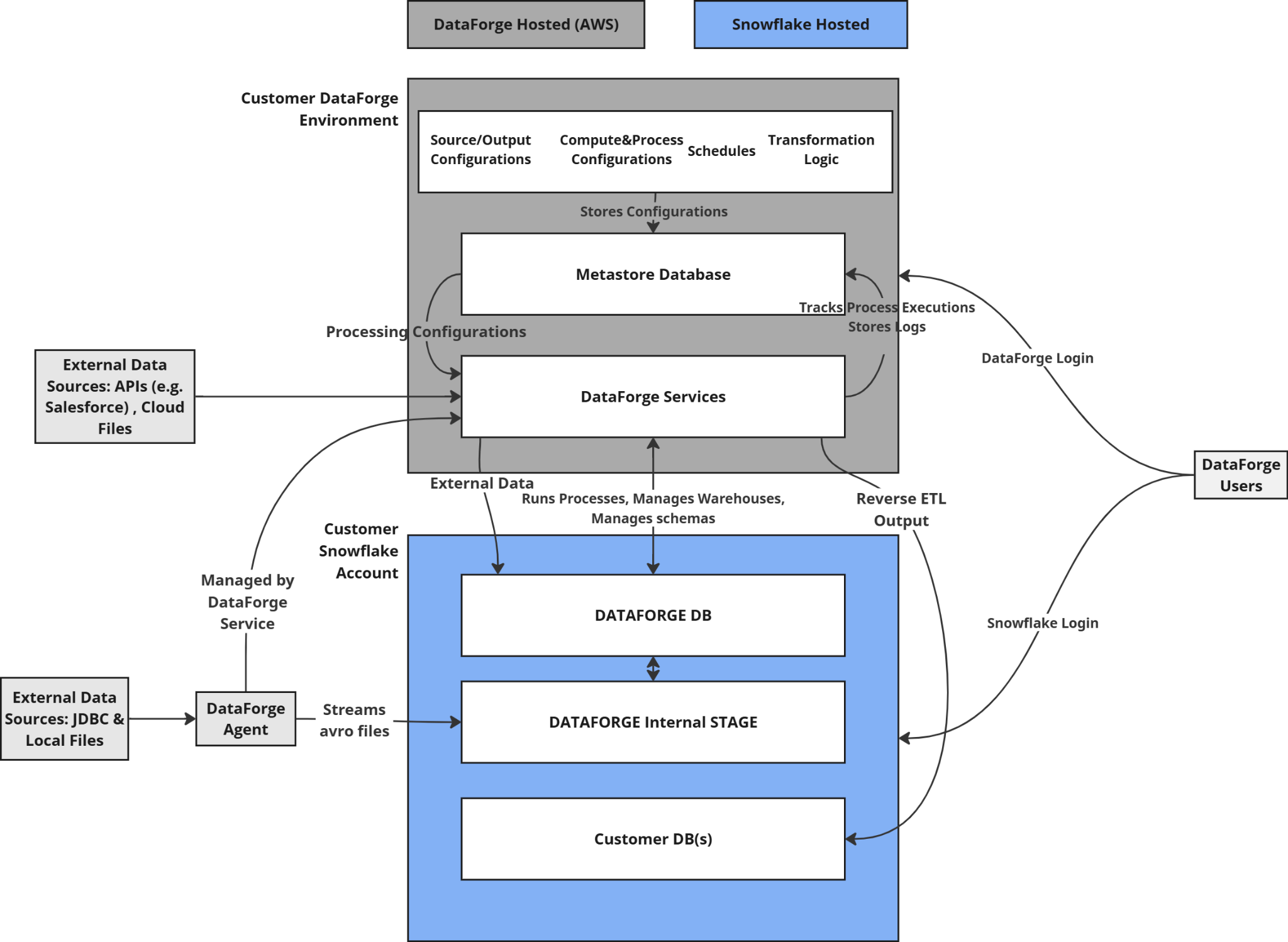
DataForge now supports running on Snowflake. Snowflake deployments have near-complete feature parity with a Databricks-based deployment, limited to the ability to output data only to Snowflake or File Storage. In future developments, DataForge plans to support additional output types.
Agent-Based Ingestions
Every Snowflake deployment includes a Local Agent, simplifying networking and access configuration. Agents operate consistently across Databricks and Snowflake by following the same Alloy layer structure.
Snowflake Compute
DataForge uses Snowflake Virtual Warehouses to execute all processing tasks. Smart defaults are included so customers can process data immediately, with the option to fully customize warehouse sizing, scaling, parallelism, and timeout behavior.
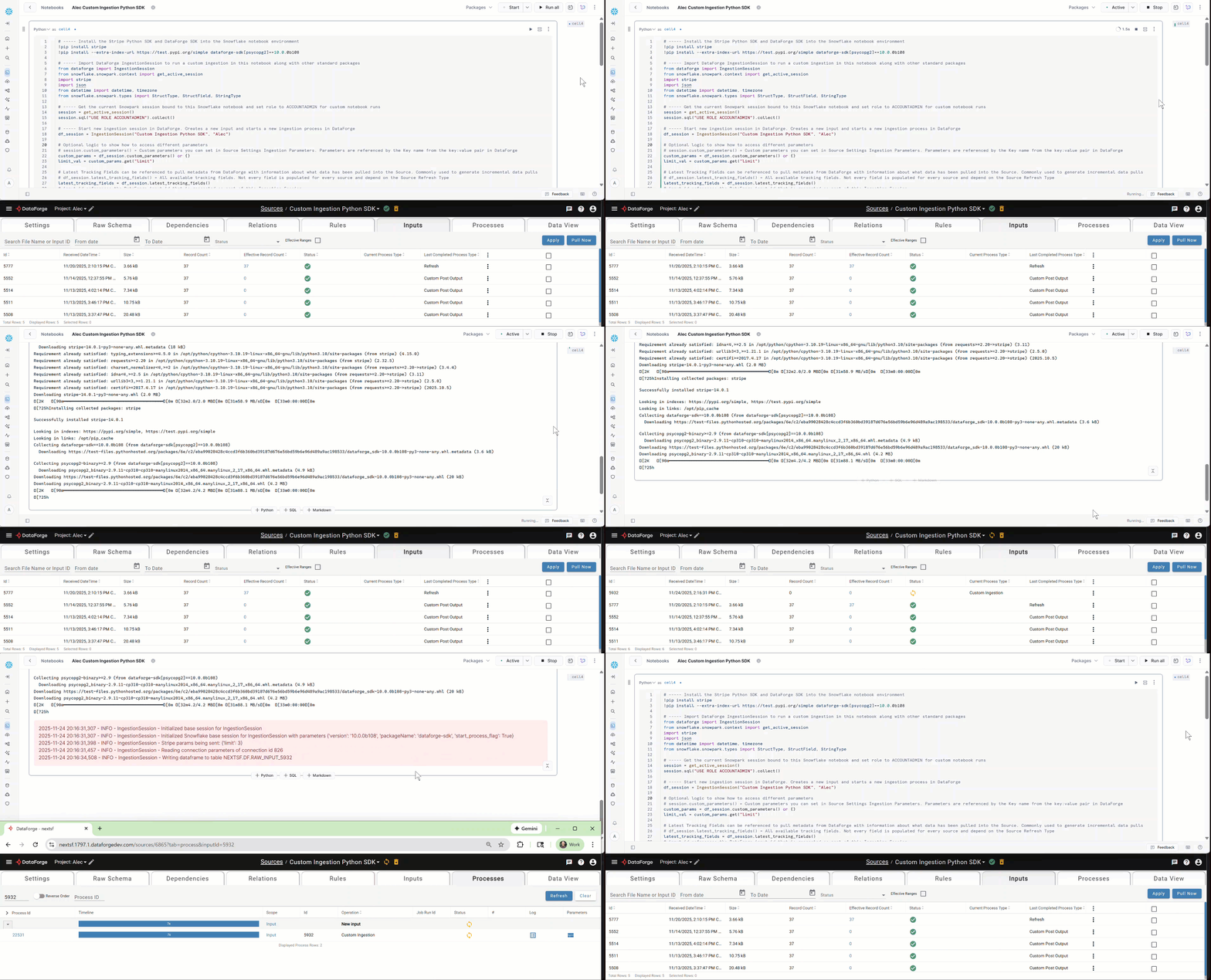
Snowpark Support
The DataForge Python SDK now supports Snowflake-based workspaces using Snowpark. Users can write custom ingestion, parsing, and post-output logic using the same SDK patterns used in Databricks. Check out the updated DataForge SDK documentation in GitHub to see how you can create custom processes for Ingestion, Parsing, and Post-Output.
Layer Visibility in Snowflake
All Alloy processing layers are stored as Snowflake tables and can be queried directly to troubleshoot and validate data. Table naming follows the format:
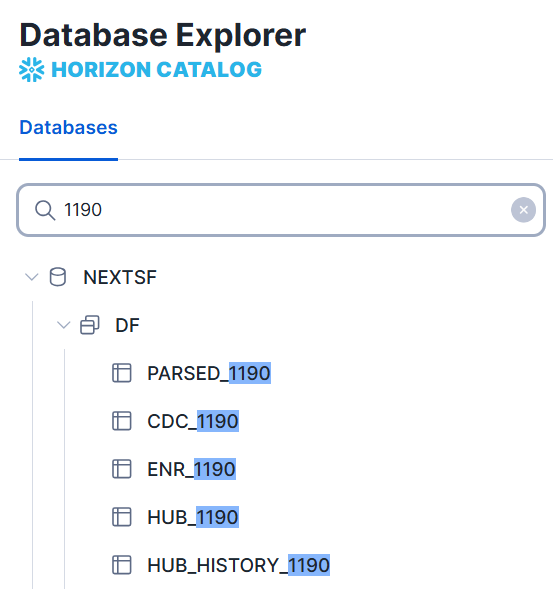
This gives Snowflake users full introspection into every step of the processing chain, aligned with the Alloy refinement model.
Unity Lakehouse Support
DataForge 10.0 introduces full Unity Catalog support across all layers of the lakehouse. This transition aligns the Databricks experience with the Alloy Architecture and makes storage behavior consistent between Databricks and Snowflake.
All processing layers now use a unified Delta-based table format that Ember tracks and governs across the workspace.
Lakehouse Layer Comparison
| Lakehouse Layer | 9.2.6 - Hive Format | 10.0 - Unity Format |
|---|---|---|
| ORE - Raw/Parsed (Ingestion/Parse) | Avro or Parquet files | Avro or Parquet files |
| MINERAL - CDC (Capture Data Changes) | Parquet files | Unity Catalog delta table, unified for all refresh types, logically partitioned by input_id, with automatic clustering |
| ALLOY - ENR (Enrichment) | Parquet files | Unity Catalog Delta table, unified for all refresh types, logically partitioned by input_id, with automatic clustering |
| INGOT - HUB (Refresh) | Hive table or Delta table with partitioning dependent on refresh type | Unity Catalog delta table, unified for all refresh types, logically partitioned by input_id, with automatic clustering |
These changes make Unity Catalog the standard for all new DataForge deployments and give customers consistent performance, storage, and governance across all Alloy layers.
Convert to Unity
The new Convert to Unity workflow allows customers to migrate Hive Metastore sources to the unified Unity format for one or many sources at a time. After migration, sources will reside in a new Unity Catalog called dataforge (configurable).
*Virtual outputs will be re-created in the dataforge unity catalog after all sources mapped to the output are converted to Unity. This will potentially break outside integrations if you have logic pointed at the namespace for the current virtual output.
*All sources mapped to virtual outputs need to be converted to unity at the same time to avoid outputs breaking.*
**All loopback type sources need to be the same format as the original source and virtual output. (i.e. Hive to Hive or Unity to Unity work. Hive to Unity or Unity to Hive will fail)*
*Hub history tables are no longer created or maintained for any sources. For debugging and troubleshooting, users can use the hub stage tables of PARSED, CDC, ENR and filter by s_input_id to see record changes over time.***
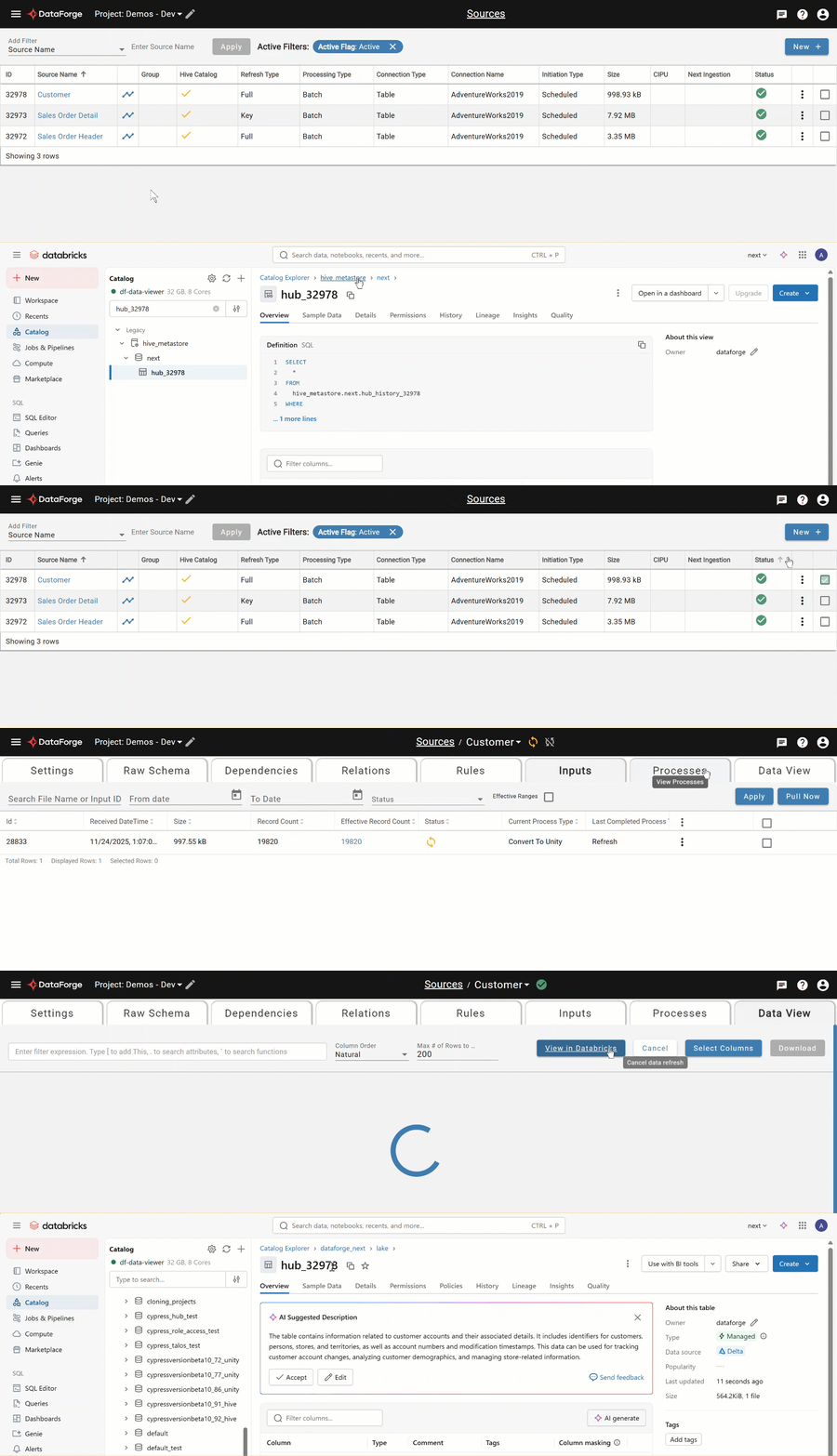
Hive Catalog Tagging
To assist with migrations, all sources display a new tag indicating whether they are stored in Hive or Unity.
Metadata in Unity via Ember Federation
The DataForge metastore is now accessible in Unity Catalog through Lakehouse Federation. Ember makes all metastore tables queryable, allowing customers to inspect metadata and platform state from within Unity.
Customers should begin planning migrations ahead of the hive_metastore end-of-support date.
Updated Databricks Runtime
DataForge 10.0 runs on Databricks Runtime 16.4 LTS. For more information, please visit the Databricks documentation:
AWS: https://docs.databricks.com/aws/en/release-notes/runtime/16.4lts Azure: https://learn.microsoft.com/en-us/azure/databricks/release-notes/runtime/16.4lts GCP: https://docs.databricks.com/gcp/en/release-notes/runtime/16.4lts
Behavior Changes
Existing customers using DataForge will notice the following behavior changes, which were implemented to support the use of Unity Catalog.
- Deleting an input will always launch an Input Delete process to remove the input and any associated metadata. Previously, if an input was deleted that had zero effective records, the input would be deleted immediately and remaining artifacts would be cleaned by the system-driven cleanup process.
- For workspaces with Data View enabled, the compute configuration that is tagged as the default will be used to produce views in the Data View tab. Previously, the data-viewer all-purpose compute was used unless the system setting to use the default compute config was enabled.
- Delta Table outputs have undergone the following changes:
- Replaced table overwrite with ALTER TABLE RENAME COLUMN that delta lake supports with
delta.columnMapping.mode' = 'name'which is already applied - Added
'delta.enableDeletionVectors' = trueto table properties to enable concurrent execution of output channels. Details found in Databricks documentation. - Removed sequential check from workflow
- Deprecated and removed partitioning and z-order
- Added liquid clustering by s_output_source_id to enable concurrent channel outputs
- Added OPTIMIZE to Cleanup for output delta tables
- Removed “Reset Channels On Delta Overwrite” setting
-
Changed table schema management from relying on dataframe.write overWriteschema/mergeSchema to explicit schema check and SQL statements:
- Added table locking to prevent concurrent schema check operations
- Create table first before writing DataFrame
- Alter table to add/remove/rename columns
- For type changes, drop/add column (this is consistent with other table output types)
- Check for legacy partitioning and remove it by performing full table overwrite in place
- Remove limitations on output column naming: delta output column names can now contain any characters
- Legacy tables with partitioning: overwrite in-process (might take time)
Developer tooling improvements
The DataForge SDK now supports custom processing for both Databricks (Python and Scala) and Snowflake (Python/Snowpark).
All SDK documentation has been fully migrated to GitHub, where customers can find sample code, language-specific examples for each platform, and community-built connectors.
Find all relevant SDK information here: https://github.com/dataforgelabs/dataforge-sdk
Performance Improvements
Delta Output Optimization and Improvements
In conjunction with the DBR 16.4 LTS update, DataForge has drastically improved the performance when working with Delta Tables.
Prior to DataForge 10.0, all Delta Table outputs ran processes sequentially for each channel. With DataForge 10.0, concurrent channel outputs are supported, resulting in much faster overall processing time.
Individual channels will no longer be overwritten after the output table schema changes. Schema changes are now done via SQL ALTER commands.
The system-driven Cleanup process incorporates the OPTIMIZE command within Databricks to keep Delta Tables efficient.
Last but not least, there are no longer limitations on output column naming. Spaces and special characters are now supported, giving you ultimate decision-making power on your naming scheme.
Optimized Hub Table Check during Processing
DataForge uses hub table checks during processing to ensure configuration and data integrity. The hub table check prior to 10.0 was a compute intensive process that checked the table schema for every process. In DataForge 10.0, this problem has been solved by tracking changes to raw attributes, enrichments, and source refresh types, and only performing hub table checks when something has changed. As a result, most processes in DataForge finish more quickly than in previous versions.
Agent-based Connection Test Improvements
Connection tests run through Agents have improved performance based on a number of changes, with completion times decreasing drastically. DataForge Agents use a new pattern that also allows connection metadata to be collected, supporting more JDBC drivers and database types.
Data Profile Improvements
DataForge has a new Relation Profile process that can be run to enable Talos AI to better recommend relations between sources. This was previously included in the Data Profile process. Splitting these into two distinct processes makes the Data Profile process that runs after every input on enabled sources much quicker.
The new Relation Profile process can be initiated by Talos.
Managed Compute Updates
All Managed Compute configurations have been updated to use the most optimal instance types and driver/worker sizing for DataForge processing. Easily switch between t-shirt-sized compute configurations to meet your needs.
AWS: rg-fleet and mg-fleet types Azure: E and D family types GCP: C4 family types
User Experience Improvements
Source Attribute Sorting
Sort orders on the Sources page have been improved for all columns to better reflect where your attention is needed. For example, sort by Size to quickly see a list of all 0 Byte sources that may need to have data pulled, or deleted to clean your workspace.
Clusters Renamed to Compute
To better reflect what each cluster configuration entails across platforms and to plan for the future, DataForge has renamed Clusters to Compute. Within each compute configuration, you can specify the type of compute required for your jobs.
Connection Metadata Search and Select
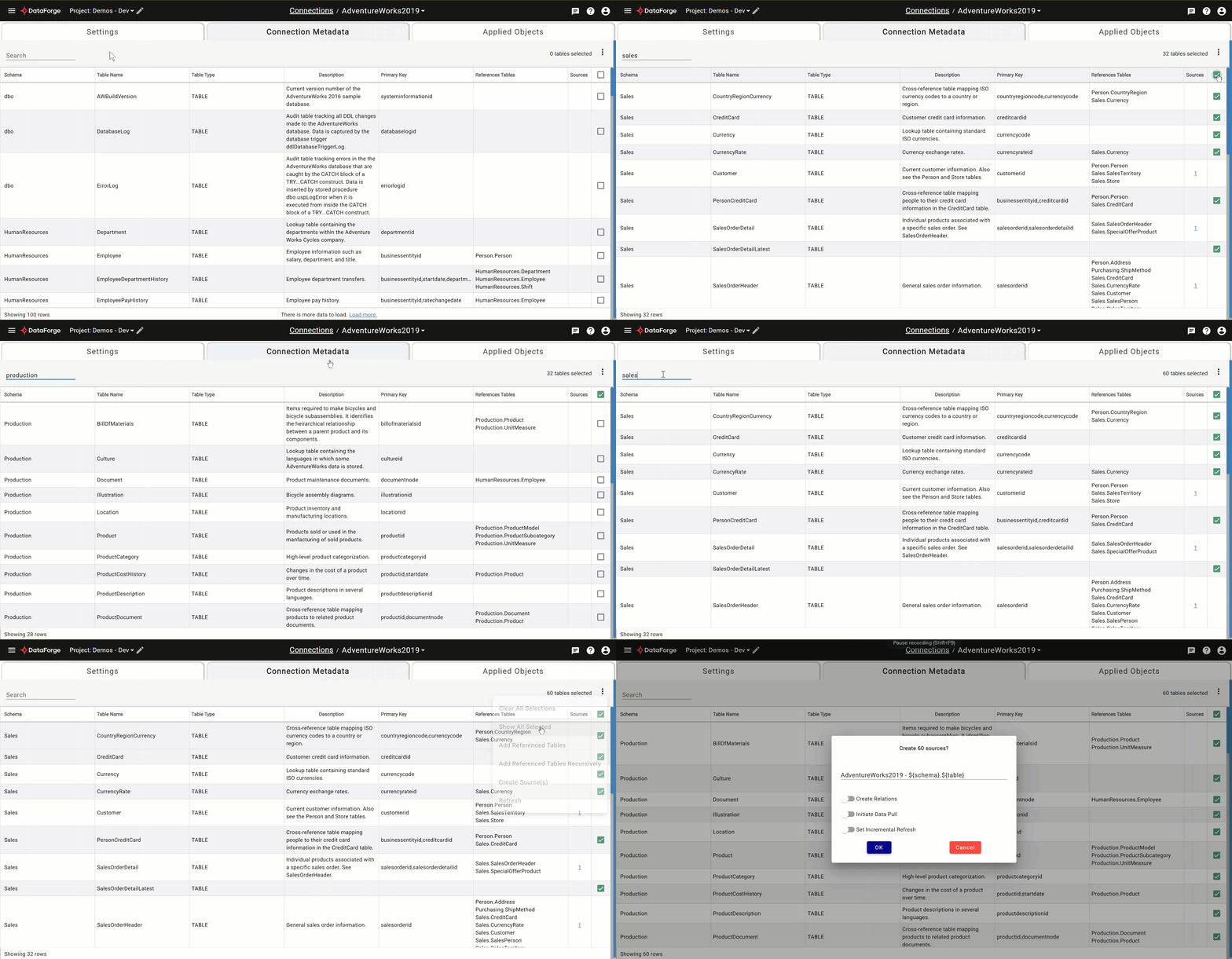
Previously, using connection metadata was limited to one search and a multi-select for bulk source creation. Now you can search multiple times with different criteria and use the bulk checkbox options within connection metadata without worrying whether tables will remain checked if they’re no longer showing on the page. A count of selected tables appears in the top right corner for reference of what is selected. There are two new menu options to clear selections and show selections.
Change OpenAI Model for Talos
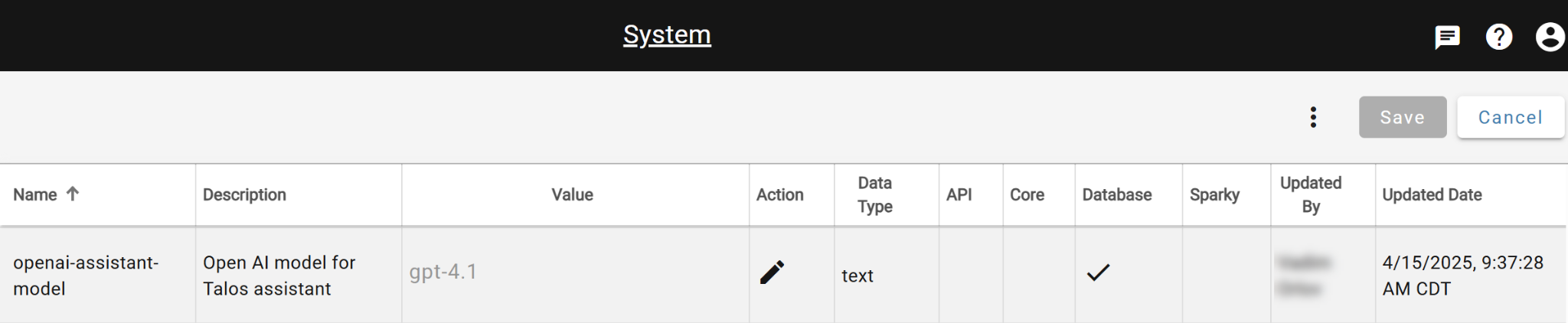
There is a new system-wide setting that allows you to dictate which OpenAI model Talos AI should use under the hood. By default, Talos uses GPT-4.1.
To change the OpenAI model, visit the System settings from the DataForge menu and update the “openai-assistant-model”. After updating, use the triple-dot menu on the System page to Restart Talos.