Salesforce Connection
DataForge includes a pre-built Salesforce connector. Before ingesting from Salesforce, create a Connected App in Salesforce to obtain OAuth credentials. See the Connected App documentation for setup instructions. Use the OAuth 2.0 method.
Selecting the Salesforce API
Create a new connection from the Connections page. Include "Salesforce" or an acronym in the name to keep it distinguishable. Select the following options:
- Connection Direction: Source
- Connection Type: API
- Uses Outcrop: No (shown as Agent in the DataForge UI)
- Application:Salesforce
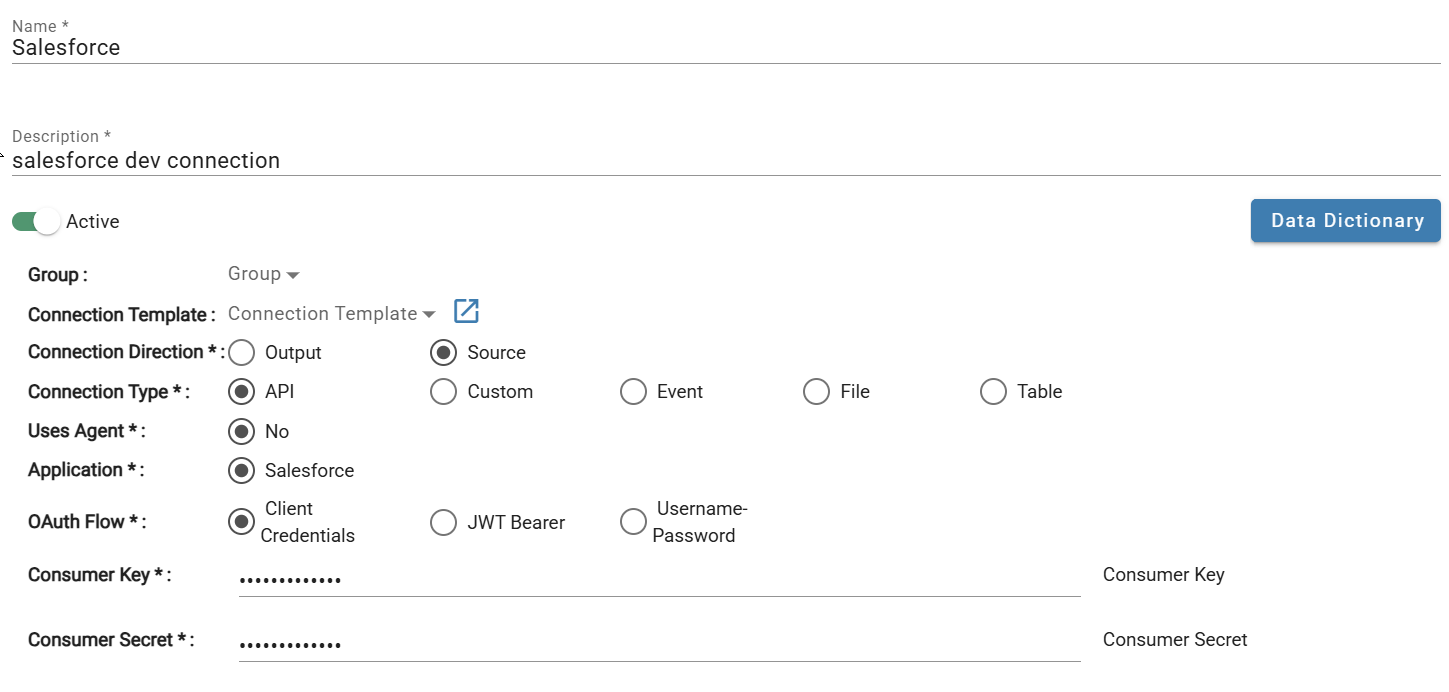
Select the appropriate OAuth Flow and fill in the required credentials.
Authentication Methods
Client Credentials
- Consumer Key: Identifies the customer to Salesforce.
- Consumer Secret: Establishes ownership of the consumer key.
See Consumer Key and Secret documentation.
JWT Bearer
- Consumer Key: Identifies the customer to Salesforce.
- Username: User authenticating the connection.
- Private Key: Used to sign the certificate in Salesforce.
See Consumer Key documentation and Private Key instructions.
Username-Password
- Consumer Key: Identifies the customer to Salesforce.
- Consumer Secret: Establishes ownership of the consumer key.
- User Name: User authenticating the connection.
- Password: Password for the user.
See Consumer Key and Secret documentation.
Connection Parameters
- Login URL: Salesforce instance URL in the format
https://<MyDomain>.my.salesforce.com. See My Domain documentation. - API Version: Version of the Salesforce API to use.
- JWT Timeout (JWT Bearer only): How long the JWT Bearer token remains valid.