DataForge Cloud 10.3 Version Features Blog
DataForge Cloud 10.3 is here, bringing the Talos MCP server, a group filter for lineage, External API 2.0, GitHub App authentication, and Databricks OAuth support!
Action Required Before Upgrading
GitHub integration now authenticates with the DataForge GitHub App instead of a personal access token. Install the DataForge GitHub App on the organization that owns your repository. External API consumers should move to the /m2m routes, since the legacy /external/* routes have been removed.
Table of Contents
- Talos MCP Server
- Lineage Group Filter
- External API 2.0
- GitHub App Support
- Databricks OAuth Support
- Configurable Expression Validation Compute
- SQL Server Change Tracking
- User Experience Improvements
- Compute Configuration Job Parameters
- Full Changelog
Talos MCP Server
The DataForge MCP server has been consolidated into Talos and now runs on a dedicated path at {api_url}/talos/mcp. Configure that URL as an MCP server in Claude Code, Codex, or any other MCP client, authenticate with your DataForge credentials when prompted, and every tool available to the Talos agent becomes available to your client.
In plain terms, you can operate the platform through conversation without opening the UI. Explore what exists, ask questions directly against landed data or the metadata database, build a pipeline end to end, then promote it.
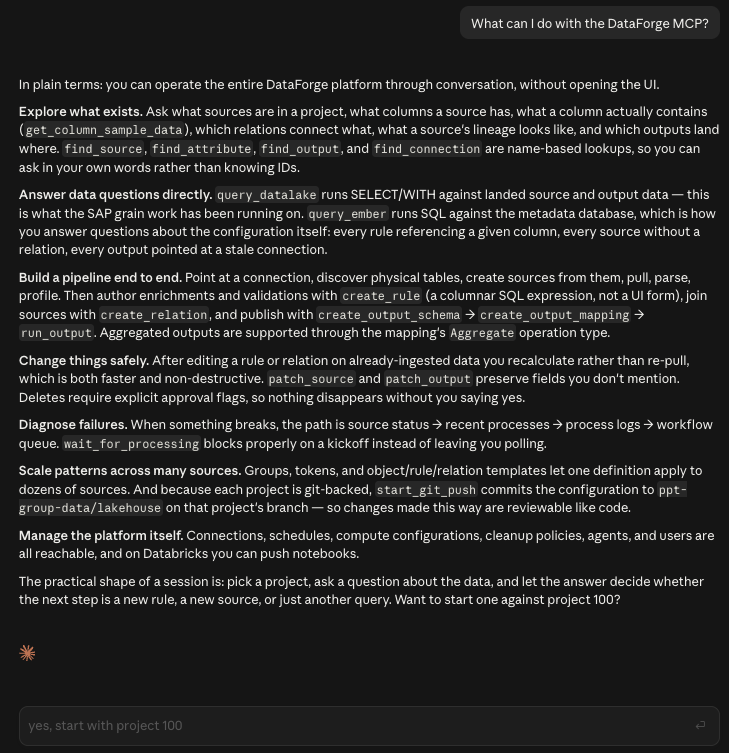
10.3 closes the gaps that previously forced you back into the UI partway through a task. The result is that an agent can now build a project, run it, watch it, and promote it in one pass.
Deterministic process tracking. Kickoff operations now return the exact process, root process, ingestion queue, or workflow queue identifier for the work they started. A new get_process tool reports exact process status along with bounded error log retrieval, and wait_for_processing anchors to the identifiers returned by the kickoff instead of reading source-wide status. Stale failure, warning, and cancellation statuses from earlier runs no longer get mistaken for the result of the run you just started.
Process cancellation. A new cancel_process tool stops queued, launching, or in progress work. It takes a process_id only, so cancellation always targets the exact process an agent started rather than a source or a queue.
Compute configurations. The MCP server can now create, update, and delete compute configurations. Previously an agent could read them but not author one, which blocked it from creating custom_ingestion sources, since those cannot exist without a compute configuration. DataForge SDK documentation and examples are also indexed in the MCP context.
Object templates. Complete CRUD for object templates is exposed through list_object_templates, get_object_template, upsert_object_template, and delete_object_template. All three kinds are supported: source, output, and connection. Connection templates are not a separate model, they are the third object template kind.
Git push and pull. Project configuration can now move to and from Git through the MCP. Push commits the project configuration to its branch and pull imports a branch into a project, with the repository and branch named in both the request and the response so the target is explicit. Both run as import processes that the MCP follows to completion. When an import is blocked pending approval because it would delete sources, the MCP can read the block, report what would be deleted, and pass back the approval or rejection. None of this requires a local clone.
For more information, visit the Setting Up the DataForge MCP Server documentation.
Lineage Group Filter
When many sources union into a single output, which is the normal shape once you are using groups and templates, the lineage graph can carry hundreds or thousands of sources and becomes impossible to read. Expanding, collapsing, and panning were the only tools available.
A Filter by group control has been added to the lineage toolbar. Open it to select any combination of groups, with Select all and Deselect all shortcuts, then choose Apply. Ungrouped nodes are always included, and Remove filter returns you to the full graph. Nodes in other groups that connect directly to your selection are included as context, with traversal stopping at those boundaries so the graph does not expand again.
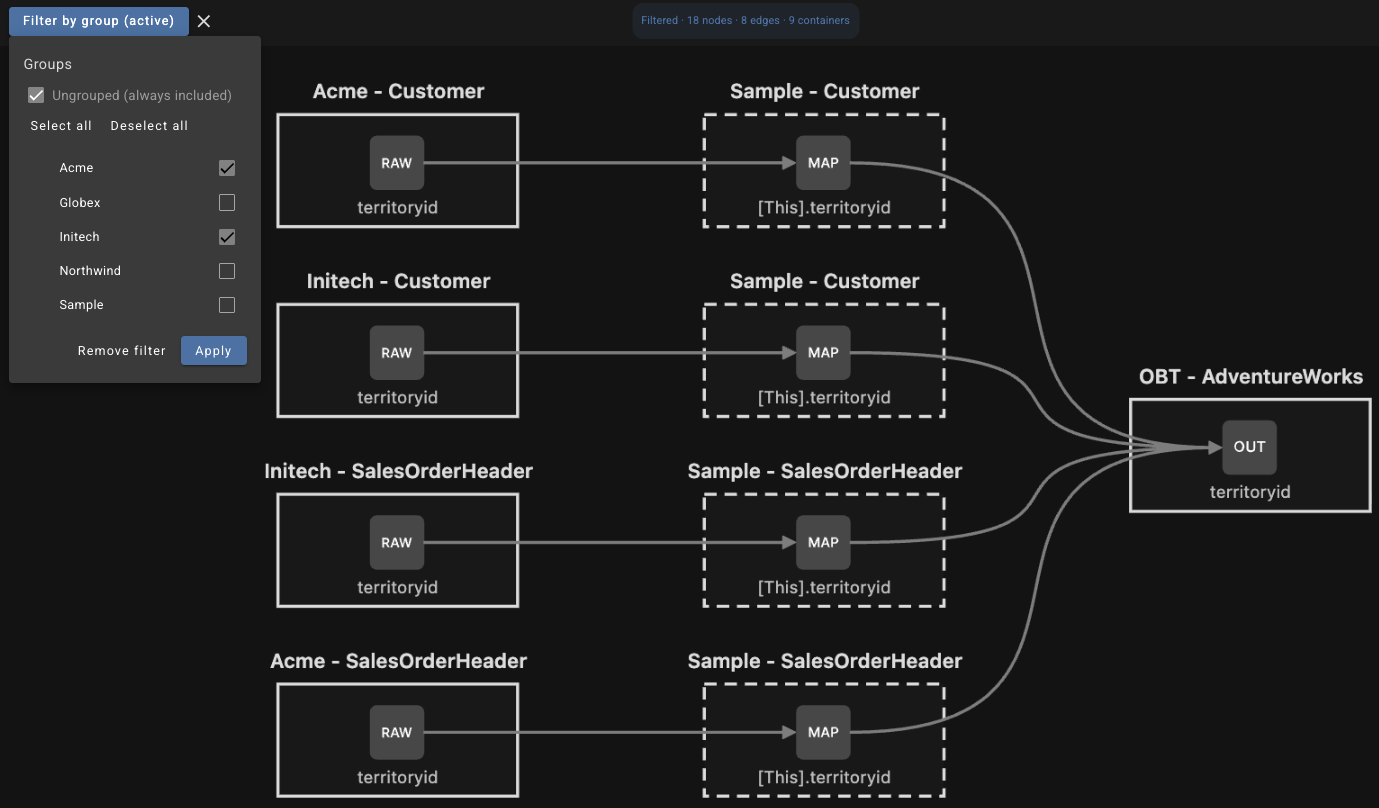
While a filter is active the toolbar button reads Filter by group (active) and the graph statistics are marked Filtered, so you always know you are looking at a subset. Active groups persist in the page query parameters, which means a filtered view can be shared or reopened. Filtering is applied during graph traversal rather than to the finished result, so a filtered graph is cheaper to produce as well as easier to read.
For more information, visit the Lineage Graphs documentation.
External API 2.0
The external API has been rebuilt around machine-to-machine authentication. Automated integrations now authenticate with client credentials, with secrets stored as bcrypt hashes, and DataForge handles token issuance, token validation, and request limit enforcement at the API layer.
Machine users are created in Users alongside everyone else and appear in the same user management list, so the project role you assign determines what the automation can do. Read-Only can list sources and query inputs, Operator or above can trigger source pulls, and Editor or above can run project Git pull or push imports.
The routes live under /m2m. Git operations start through /m2m/git/{operation}/{projectId}, which returns an import_id you can poll for status, and failures return the logged error body rather than a raw validation dump. The legacy /external/* routes have been removed.
For more information, visit the External API documentation.
GitHub App Support
DataForge now authenticates to GitHub with the DataForge GitHub App. You no longer enter or maintain a GitHub personal access token in DataForge, which removes the token rotation burden and the pushback that came with granting a PAT the access DataForge needed.
Before connecting a project to a repository, install the DataForge GitHub App on the GitHub organization that owns the repository and grant it access to the specific repositories DataForge should manage. The person installing needs permission to install GitHub Apps for the organization. If GitHub shows Request instead of Install, an organization owner has to approve it.
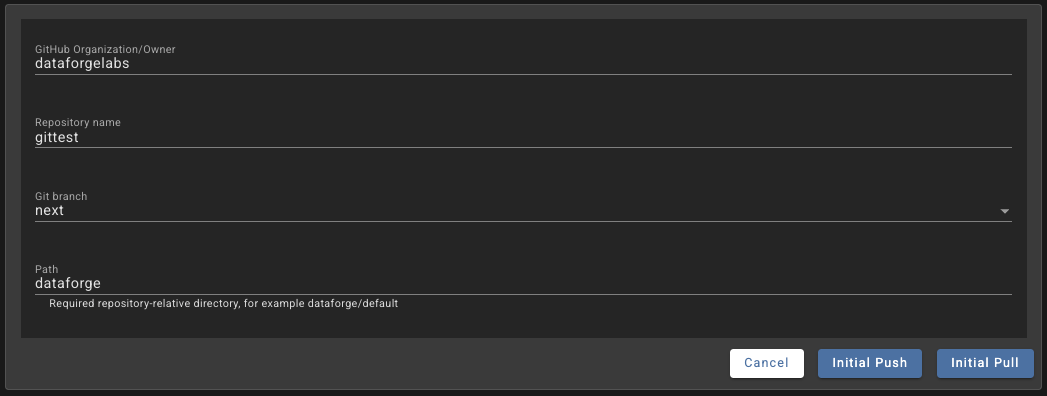
With the app installed, connecting a project asks only for the GitHub organization, repository name, branch, and a repository-relative path. There is no token to paste or rotate.
Relation exports also order by a hash of the relation UID rather than alphabetically. The relations.yaml format and importer are unchanged, but concurrent relation additions are now distributed through the file instead of clustering, which meaningfully reduces merge conflicts when several developers add relations at once.
For more information, visit the Managing Projects with Github documentation.
Databricks OAuth Support
DataForge can now authenticate to Databricks with OAuth instead of a personal access token. New environment signup and token update flows include a Databricks authentication type selection offering PAT or OAuth. Choosing OAuth reveals fields for the client ID and client secret, which DataForge stores in the system configuration secret as databricks-client-id and databricks-client-secret, and sets databricks-auth-type to oauth.
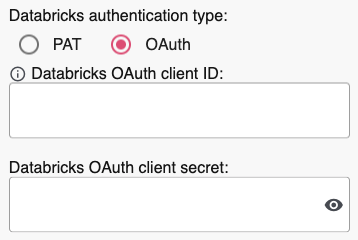
Once configured, OAuth is used for all Databricks API calls made by deployment, api, and core, as well as JDBC Databricks calls made by api and the agent.
Configurable Expression Validation Compute
Expression validation no longer runs on a local Spark instance inside the API. It now runs on Databricks, which means you can reference any function or expression available in your Databricks environment when writing rules.
A new optional system configuration parameter, databricks-expression-cluster-id, controls which compute is used. It defaults to NOT CONFIGURED. When it is left unset, the API searches your available SQL warehouses and selects one automatically, prioritizing serverless warehouses with the smallest size, then uses that warehouse for all expression validations. Set the parameter explicitly when you want validations pinned to a specific cluster.
For more information, visit the Global System Configurations documentation.
SQL Server Change Tracking
SQL Server streaming sources can now use Change Tracking in addition to Change Data Capture. A new Tracking Method parameter in the source ingestion parameters accepts two values:
| Value | Method |
|---|---|
cdc |
Change Data Capture, the method implemented in 10.1 |
change_tracking |
SQL Server Change Tracking, new in 10.3 |

Change Tracking is lighter weight than CDC and is a good option when your DBA team is reluctant to enable CDC, or where the overhead of CDC is not justified by the change volume.
For more information, visit the SQL Server Streaming documentation.
User Experience Improvements
Template reliability
Rule and relation templates behave far more predictably in 10.3, particularly when changes propagate through chains of linked rules.
- Changes to an upstream template now reach templates that depend on it, instead of stopping at the first template.
- When propagation is blocked or only partially applied, the template is no longer saved on its own. Previously the template row persisted while its linked rule instances did not update, leaving a template out of sync with its own rules.
- Datatype and schema changes no longer propagate to inactive downstream rules, which previously pushed those rule instances out of alignment with their template. Behavior for active downstream rules is unchanged.
- Parent changes that would silently diverge a downstream templated rule, such as switching Snapshot to Keep Current or altering a datatype, are now blocked with an error naming the downstream rule rather than quietly rewriting the instance.
- Relation templates can now use rules that are not themselves templated. That restriction has been lifted.
- Applying a rule template to a source no longer allows a rule whose name collides with an existing raw attribute.
- Rule templates no longer store an empty datatype, which previously copied through to every generated rule.
Rule template apply performance
The Rule Template Apply page no longer loads every source in the project and freezes the browser. Redundant downstream rule rechecks are skipped when a template's datatype has not changed, and applying linked rules is now separated from saving the template. The apply runs in core as a long running process with its status visible in the UI, so you can save a template change without waiting on the apply to finish.
Stream control while a project is locked
Bulk Update is now available for the Disable Initiation parameter while a project is locked, so you can start and stop source streams without unlocking the project. Unrelated source configuration changes remain blocked, which is what the project lock is there to prevent.
Disable Initiation preserved on import
Importing a project or pulling from Git no longer overwrites the Disable Initiation value on sources that already exist in the target project. New sources still import all ingestion parameters normally, and every other eligible setting continues to update from the Git definition.
Compute Configuration Job Parameters
A Max Concurrent Runs parameter has been added to the Job Configuration section of compute configurations. It sets the maximum number of concurrent runs allowed for the underlying Databricks job.

Queueing is now always enabled on DataForge jobs, so additional runs wait for a slot once the limit is reached rather than being skipped. Together these give you a way to smooth workloads against cloud quota limits instead of absorbing failures when a quota is hit.
For more information, visit the Compute Configuration Overview documentation.
Full Changelog
- Added a Max Concurrent Runs parameter to compute configurations, and enabled Databricks job queueing so additional runs wait for a slot once the limit is reached.
- Added a Tracking Method ingestion parameter for SQL Server streaming sources, supporting both CDC and Change Tracking.
- Added a Filter by group control to the lineage visualization page.
- Added Databricks OAuth authentication for the DataForge service principal.
- Added the
databricks-expression-cluster-idsystem configuration parameter for expression validation compute. - Added machine-to-machine authentication and
/m2mroutes, replacing the legacy/external/*external API. - Added DataForge GitHub App authentication, replacing GitHub personal access tokens.
- Added Talos MCP tools for process cancellation, compute configuration management, object template CRUD, and project Git push and pull.
- Changed new workspace deployments to use a Unity Catalog external location instead of a Databricks instance profile and dbfs mount, with Datalake Path inferred from the external location. Existing workspaces are unaffected.
- Changed relation exports to order by a hash of the relation UID, reducing
relations.yamlmerge conflicts. The file format and importer are unchanged. - Downgraded agent and core to Akka 2.8.5 while retaining Java 21 virtual threads for blocking I/O.
- Improved performance of the Rule Template Apply page and moved linked rule apply to a long running process with visible status.
- Fixed agent heartbeat behavior that could strand queued ingestions or deliver the same process twice.
- Fixed batch refresh for sources with refresh type None ignoring
parameters.input_idsand leaving earlier inputs stale. - Fixed project import not applying the Output Schema Name variable to virtual outputs.
- Fixed adding an output channel failing when output column positions were duplicated.
- Fixed Reset Filtered Channels resetting only one channel when the same source was mapped multiple times.
- Fixed initial pull failing with a GitHub installation token error and then reporting an invalid origin on retry.
- Fixed MCP tools silently overwriting channel settings, reporting false failures, and ignoring tool list filters.
- Fixed the MCP
update_output_mappingtool being unable to add or edit channel mappings. - Fixed an inactive user being able to regain access and reactivate their own account.
- Fixed logout requiring multiple clicks.