Kafka Events Connection
DataForge integrates with Kafka Event Topics for batch or stream source ingestion and output publishing. For Kafka setup, see the Apache Kafka documentation. Authentication examples below use Confluent.
Source Connection
Create a new connection with the following settings:
- Connection Direction:Source
- Connection Type:Event
- Uses Outcrop:No (shown as Agent in the DataForge UI)
- Platform:Kafka
- Kafka Boostrap Servers*: Enter hosted server location of Kafka
Expand Parameters and fill in:
- Kafka Parameters: Configure optional non-sensitive parameters for connecting to Kafka.
- Example to configure PLAIN authentication: {"kafka.sasl.mechanism":"PLAIN","kafka.security.protocol":"SASL_SSL"}
- Kafka Sensitive Parameters: Configure sensitive parameters for connecting to Kafka.
-
Example to configure PLAIN authentication (typically API keys used for username/password):
{"kafka.sasl.jaas.config":"kafkashaded.org.apache.kafka.common.security.plain.PlainLoginModule required username=\"
\" password=\" \";"} - Schema Registry Address:Host address of the schema registry - Schema Registry Parameters: Configure optional non-sensitive parameters for connecting to Kafka Schema Registry. - Example: {"confluent.schema.registry.basic.auth.credentials.source":"USER_INFO"} - Schema Registry Sensitive Parameters: Configure optional sensitive parameters for connecting to Kafka Schema Registry. - Example using API keys for Schema Registry: {"confluent.schema.registry.basic.auth.user.info":"
: "}
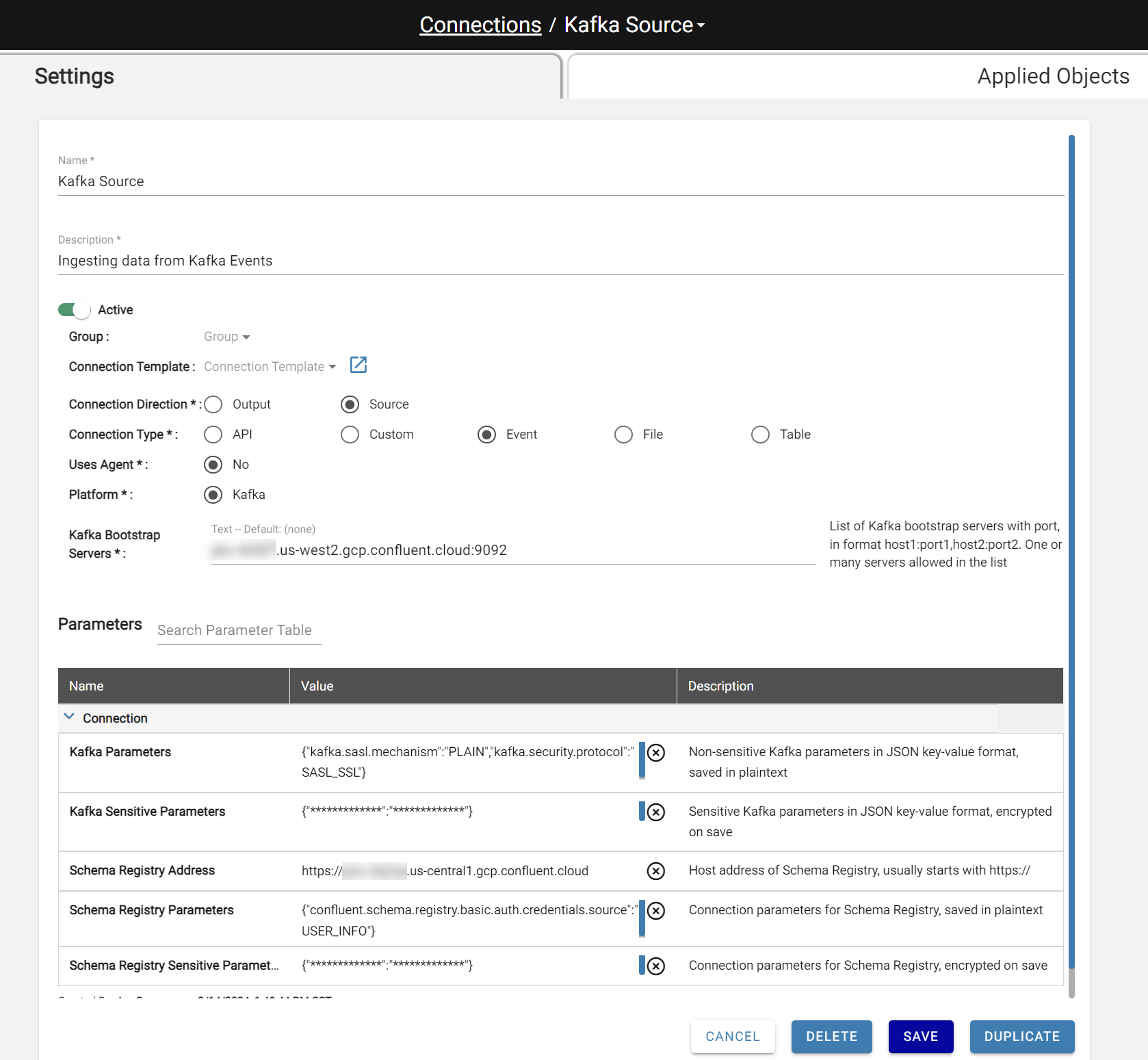
Source Settings
Create a new Source with these settings:
- Processing Type: Batch or Stream
- Connection Type: Event
- Connection: Select a Kafka source connection
- Topic Name: Kafka topic name from the connection server
If the selected connection has a Schema Registry defined, the parameters below are optional. If not, expand Ingestion Parameters to fill in the required fields.
| Parameter Name | Value | Description |
|---|---|---|
| Select List | , value. | Applies specified comma-separated select list to ingested data, allowing to expand or hide columns. Expands struct attributes to unique columns via struct. For Kafka events, value. is a common use case. |
| Value Schema Type | binary, avro, avro_from_registry, json | Schema type for value schema. Used to associate event with schema during ingestion |
| Key Schema Type | binary, avro, avro_from_registry, json | Schema type for key schema. Used to associate event with schema during ingestion |
| Value Schema | Dependent on Value Schema Type. Binary: not required Avro: JSON (Avro) format JSON: JSON (DDL) format | Json (avro) or text (json DDL) specified when not using schema registry |
| Key Schema | Dependent on Key Schema Type. Binary: not required Avro: JSON (Avro) format JSON: JSON (DDL) format | Json (avro) or text (json DDL) specified when not using schema registry |
| Key Subject | Open text | Schema registry subject for key schema |
| Value Subject | Open text | Schema registry subject for value schema |
| Kafka Parameters | JSON | Non-sensitive Kafka parameters in JSON key-value format, saved in plaintext |
| Kafka Sensitive Parameters | JSON | Sensitive Kafka parameters in JSON key-value format, saved in plaintext |
| Starting Offsets | earliest, deltas, JSON format Example: {"topic":{"<partition_no":offset}} | Starting offsets for topic, options are "earliest","deltas" or a json string. Only applies to first input if "deltas" is used as value |
| Ending Offsets | latest or JSON format Example: {"topic":{"<partition_no":offset}} | Ending offsets for topic, options are "latest" or a json string |
| Strip Leading Binary Bytes | Number | Remove byte amount of binary data from value record that points to schema registry |
| Number of Topic Partitions | Number | Define if "deltas" is specified for starting_offsets but some partitions on the topic have no data. This will fill in the delta offsets for missing partitions with "-2" to get earliest on those partitions, preventing ingestion error |
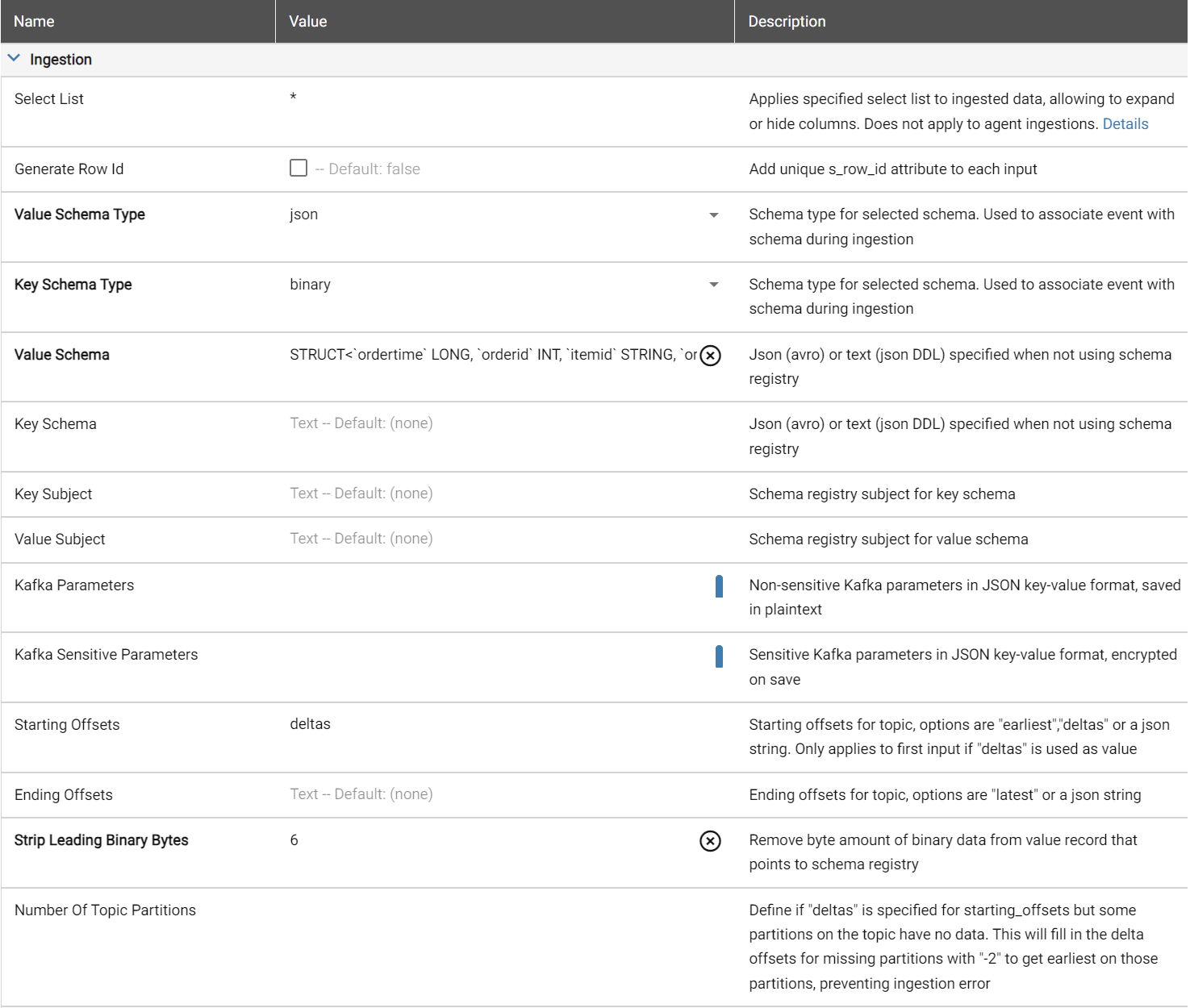
Example of no schema registry JSON deltas format
Output Connection
Create a new connection with the following settings:
- Connection Direction:Output
- Connection Type:Event
- Platform:Kafka
- Kafka Boostrap Servers*: Enter hosted server location of Kafka
Expand Parameters and fill in:
- Kafka Parameters: Configure optional non-sensitive parameters for connecting to Kafka.
- Example to configure PLAIN authentication: {"kafka.sasl.mechanism":"PLAIN","kafka.security.protocol":"SASL_SSL"} to
- Kafka Sensitive Parameters: Configure sensitive parameters for connecting to Kafka.
-
Example to configure PLAIN authentication:
{"kafka.sasl.jaas.config":"kafkashaded.org.apache.kafka.common.security.plain.PlainLoginModule required username=\"
" password=\" ";"} - Schema Registry Address:Host address of the schema registry - Schema Registry Parameters: Configure optional non-sensitive parameters for connecting to Kafka Schema Registry. - Example: {"confluent.schema.registry.basic.auth.credentials.source":"USER_INFO"} - Schema Registry Sensitive Parameters: Configure optional sensitive parameters for connecting to Kafka Schema Registry. - Example: {"confluent.schema.registry.basic.auth.user.info":"
"}
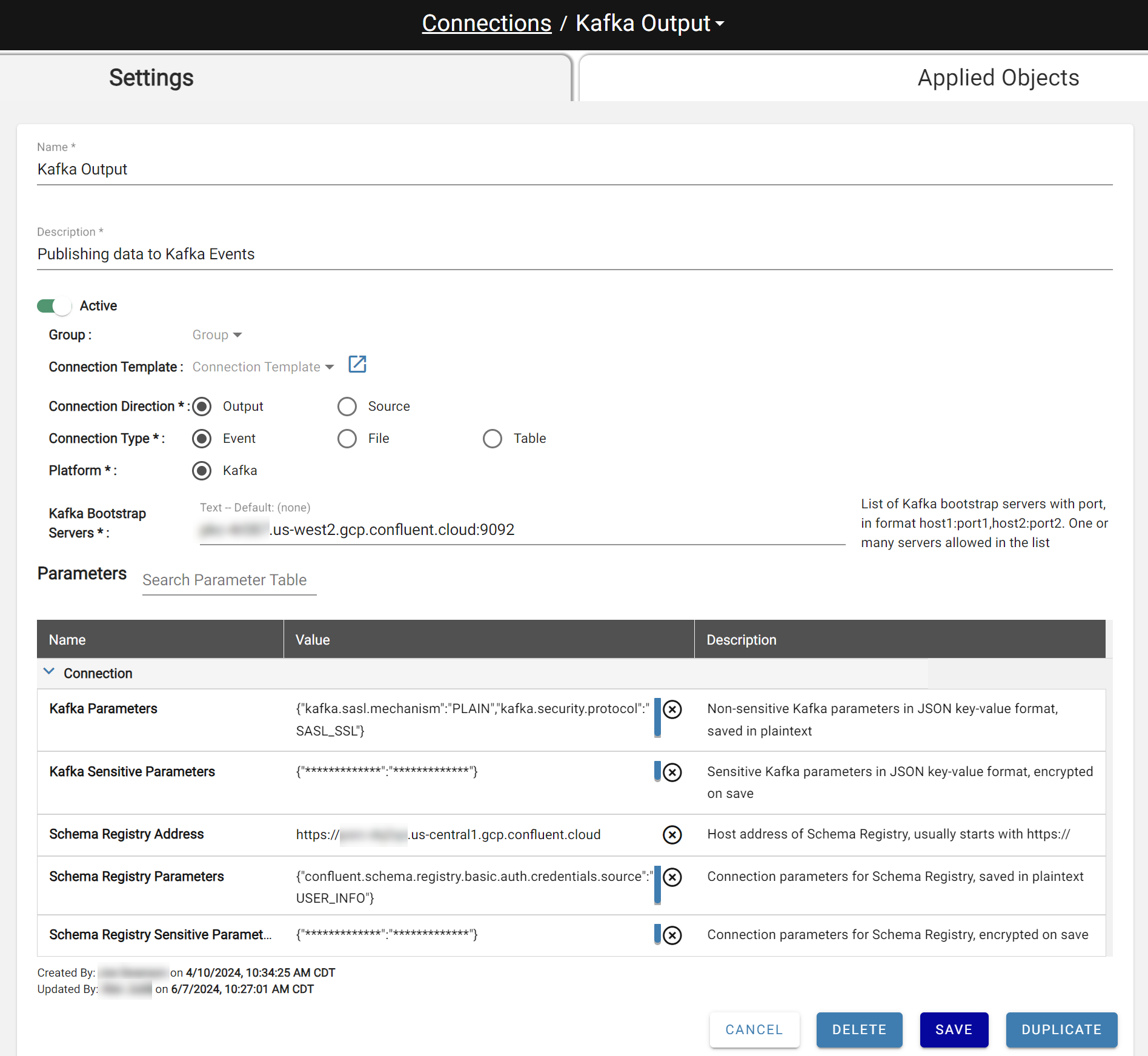
Output Settings
Create a new Output with these settings:
- Output Type: Event
- Connection: Select a Kafka output connection
- Topic Name: Kafka topic name from the connection server
If the selected connection has a Schema Registry defined, the parameters below are optional. If not, expand Output Parameters to fill in the required fields.
| Parameter Name | Value | Description |
|---|---|---|
| Value Schema Type | string, avro, avro_from_registry, json | Schema type for value schema. Used to associate event with schema during output |
| Key Schema Type | string, avro, avro_from_registry, json | Schema type for key schema. Used to associate event with schema during output |
| Value Schema | Dependent on Value Schema Type. String: not required Avro: JSON (Avro) format JSON: JSON (DDL) format | Json (avro) or text (json DDL) specified |
| Key Schema | Dependent on Key Schema Type. String: not required Avro: JSON (Avro) format JSON: JSON (DDL) format | Json (avro) or text (json DDL) specified |
| Key Subject | Open text | Schema registry subject for key schema |
| Value Subject | Open text | Schema registry subject for value schema |
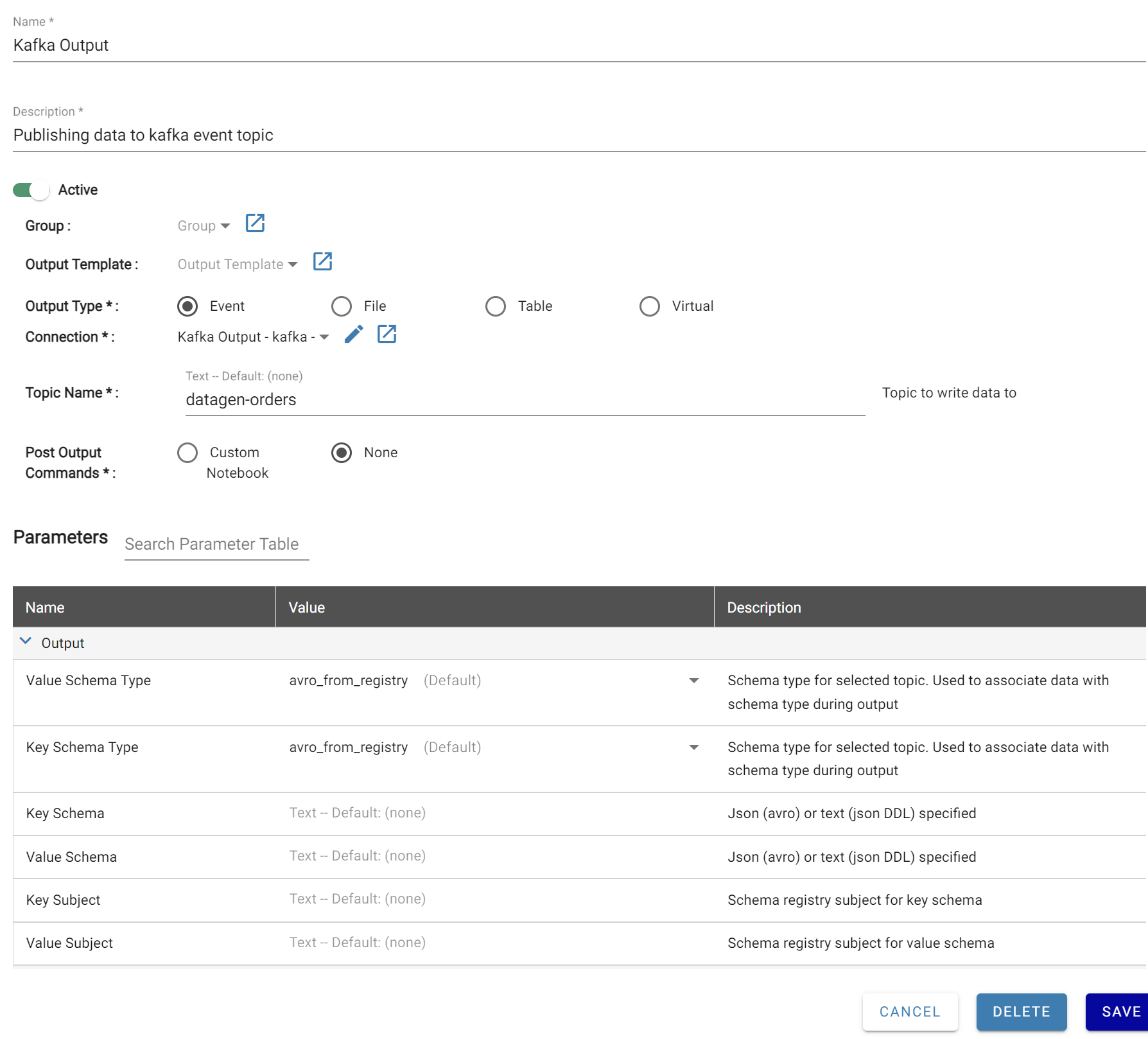
Output Mapping
Kafka Outputs only allow sources with Full, Key, or None refresh types for Source Mappings. Kafka Outputs only support two columns, key and value. When the Output settings are first saved, these columns will be automatically added to the Mapping definition.
The Key and Value columns can only be data types of either String or Struct.
To convert a String into Struct:
- Open the Source mapped to the output
- Create a rule that builds the Struct result referencing the String attribute
- Map the Struct rule attribute to the output mapping column
