Resetting Processes
Types of Resets
Use this guide to decide how to reset data when changing source settings, applying rules, updating output tables, or restarting failed processes.
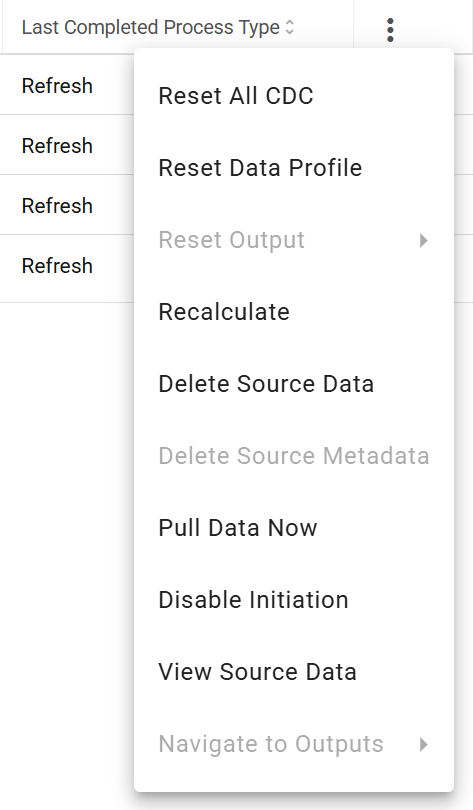
Source-level reset buttons:
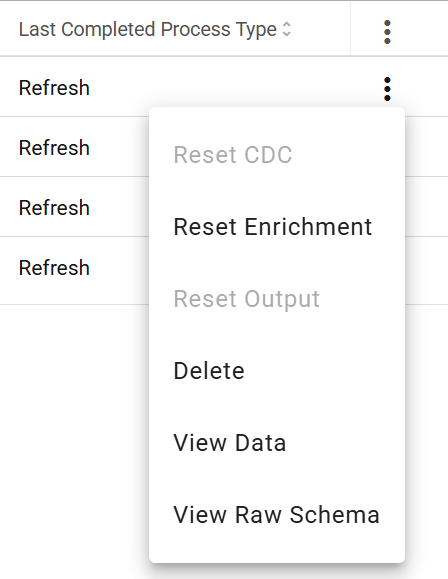
Input-level reset buttons:
Ingestion Parameters Have Changed
If the source query is changed to pull a completely new dataset, delete all source data and metadata. If the change switches from a historic load query to a delta query, no data or metadata reset is needed.
Parsing Parameters Have Changed
For File connection type sources, use the input-level Reset Parse button after changing any parsing parameter. If the change could alter raw metadata, delete all source data, clear metadata, and reload.
Refresh Type or Change Data Capture Parameters Have Changed
When the Refresh Type is changed, DataForge will prompt you to reset CDC on save — this is required to prevent data integrity issues. During development, it's often faster to delete all source data first, save the change, then pull new data.
Do not reset CDC after changing rules — it causes unnecessary extra processing.
Validation/Enrichment Rules Have Changed
Two options to propagate rule changes to existing data:
- Recalculate (source-level): Runs only updated or new rules against the current hub table, skipping the expensive refresh process. Recommended.
- Reset Enrichment (input-level): Reruns enrichment for a single input and all downstream processes. Useful for testing individual inputs.
Output Parameters/Mappings Have Changed
Two options to reset output after changes:
- Reset All Output (source-level): Optimized for refresh types, especially when deletes are involved. Recommended for production.
- Reset Output (input-level): Resets output for a single input. Useful for testing output changes before running all inputs.
Ingestion Has Failed
A failed Ingestion process can not be reset. Delete the failed input using the input level "Delete" button and use the source level button "Pull Data Now" or the "Pull Now" button above the input table to kick off a new Ingestion process.
Parse Has Failed
Once the error has been resolved, use the input level "Reset Parse" button to enqueue a new Parse process for the failed input.
Capture Data Changes Has Failed
Once the error has been resolved, use the input level "Reset CDC" button to enqueue a new CDC process for the failed input.
Enrichment Has Failed
Once the error has been resolved, use the input level "Reset Enrichment" button to enqueue a new Enrichment process for the failed input.
Refresh Has Failed
Once the error has been resolved, use the source level "Retry Last Failed Process" button to enqueue a new Refresh process for the failed input.
Output Has Failed
Once the error has been resolved, use the input level "Reset Output" button to enqueue a new Output process for the failed input. The source level reset button can be used here as well if multiple inputs have failed.